

Android Switch
DownloadApp details
- Version
- 1.0.968680808
- Updated
- 06.09.2026
- Category
- Tools
- Compatibility
- Android 10+
- Package name
com.google.android.apps.restore- Source
- Official Google Play page
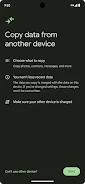
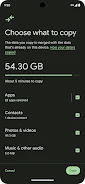
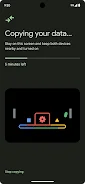
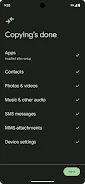
Android Switch is a built-in utility already present on your Android device, designed to simplify the process of migrating your personal data. It allows you to securely copy essential information such as photos, videos, contacts, and other files from one phone or tablet to another. This feature is particularly useful during the initial setup of a new device, ensuring that your digital life transitions smoothly without manual intervention or complex configuration steps.
The application is seamlessly integrated into the Android ecosystem, meaning you do not need to download it from an external source. It is already installed on your Android device, ready to assist you whenever you need to move data. This native integration ensures high compatibility and security, leveraging the operating system's own protocols to protect your sensitive information during the transfer process.
You can trust that your media and contacts are handled with care. For users with newer hardware, specifically the Pixel 9 series or newer devices including the Pro, Pro Fold, and A-Series, Android Switch offers enhanced flexibility. You can use the tool to move your data anytime after the initial setup is complete.
This means you are not restricted to just the first few minutes of configuring your new phone.
How to install the app
- Check the version, Android compatibility, developer and source in the app details block.
- Open the Downloads tab and use the official source or an available catalog link.
- Before installing, review app permissions and use only sources you trust.
Frequently asked questions
Is Android Switch free to use?
Yes, Android Switch is already installed on your Android device and is free to use for transferring data.
Can I use Android Switch after the initial setup?
Yes, if you have a Pixel 9 or newer device, you can use Android Switch to move data anytime after setup.
What data can be transferred using Android Switch?
You can securely copy photos, videos, contacts, and other files from another phone or tablet.
Do I need the other device to transfer data?
For Pixel 9 and newer devices, you can use Android Switch to move data even if you do not have your other device nearby.








No comments yet. Be the first!