

APK MONTAZNIK PRO
Open in Google PlayApp details
- Version
- 16.0.1 (1601)
- Updated
- 25.12.2020
- Category
- Tools
- Package name
com.magdalm.apkinstaller- Developer
- Magdalm
- Source
- Official Google Play page
APK MONTAZNIK PRO is a straightforward utility designed for installing APK files on Android devices. It stands out for its user-friendly and convenient interface, making it one of the most visually appealing tools in its category. The combination of simplicity and broad functionality allows users to handle tasks quickly and efficiently without needing technical expertise.
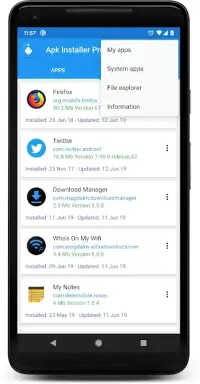
When you connect the app, it automatically begins scanning the smartphone's file manager and external SD card. Upon identifying files in the APK format, it organizes them into a single list sorted alphabetically. This feature makes it effortless to locate the desired document and initiate its installation on your mobile device with minimal effort.
Beyond basic installation, the utility provides detailed information about APK files, including the name, additional details, creation date, size, and location. With just a single tap, you can start the installation process on your gadget. The software is known for its excellent performance and ability to manage installation goals effectively.
The application features beautiful management with minimal visual effects, ensuring a clean and distraction-free experience. Its lightweight nature and high efficiency make it ideal for users who value speed and simplicity. The minimalist design helps users navigate the broad functionality without unnecessary complexity, ensuring a smooth and reliable installation experience every time.
How to install the app
- Check the version, Android compatibility, developer and source in the app details block.
- Open the official app page on Google Play if a link is available.
- Before installing, review app permissions and use only sources you trust.
Frequently asked questions
How does APK MONTAZNIK PRO find files?
The app automatically scans the internal file manager and external SD card to locate all available APK files, organizing them in an alphabetical list for easy access and quick installation.
What details does the app show for APKs?
It displays comprehensive information such as the file name, creation date, file size, and storage location, helping you verify the correct file before installation begins on your device.
Is the interface complex to use?
No, the interface is designed to be minimalist and user-friendly, allowing for easy navigation and quick installation with just a single tap, even for beginners.
Does it support external storage?
Yes, the application supports scanning both the internal file manager and external SD cards, ensuring you can find and install APK files from any location on your Android device.
Similar apps







No comments yet. Be the first!