
App Tracker - TrackPulse
DownloadApp details
- Version
- 1.004
- Updated
- 04.10.2026
- Category
- Tools
- Compatibility
- Android
- Package name
com.overkaiser.trackpulse- Developer
- Overkaiser
- Source
- Official Google Play page
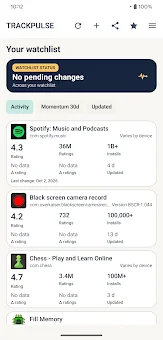
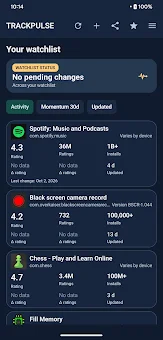
Stop endlessly scrolling through the Google Play Store to see if your favorite apps have updated. App Tracker - TrackPulse transforms simple app lists into a personalized monitoring dashboard. Add the programs you care about and track their evolution directly.
Move important changes around and receive notifications without the need to manually open the app store every time to check for updates. The core functions of TrackPulse allow you to see at a glance which programs have changed. The add-on periodically checks the monitored list and notifies you only when it detects an update.
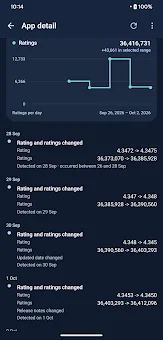
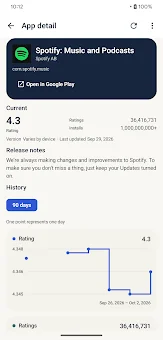
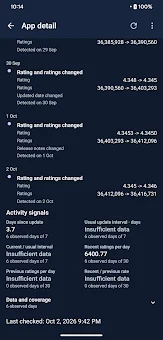
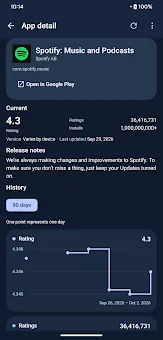
You have key indicators in one place: rating, number of reviews, installation range, version, date of the last update, and release notes. This ensures you stay informed without clutter. Change history is presented with clear graphics that cover periods of 90 days, one year, or two years.
This allows you to track the popularity dynamics of your selected applications. You can also view the last activity, such as the number of days since the last update, typical intervals between releases, and the latest user reviews. Add-ons with new changes are clearly marked so you can focus on what matters most.
Your monitoring list can be sorted by recent activity, rating dynamics over the last 30 days, or dynamics since the last update. Adding an app is simple: just paste a link from Google Play, enter the package name, select an installed add-on, or share a list directly.
How to install the app
- Check the version, Android compatibility, developer and source in the app details block.
- Open the Downloads tab and use the official source or an available catalog link.
- Before installing, review app permissions and use only sources you trust.
Frequently asked questions
How does App Tracker - TrackPulse notify users of updates?
The application periodically checks the monitored list and sends a notification to the user only when it detects a new update or change in the tracked app.
What data can I track for each application in TrackPulse?
You can track key indicators such as the current rating, number of reviews, installation range, current version, date of the last update, and detailed release notes.
Can I sort my monitored apps based on specific criteria?
Yes, you can sort your monitoring list by recent activity, rating dynamics over the last 30 days, or dynamics since the last update to prioritize your view.
Is App Tracker - TrackPulse suitable for developers?
It is ideal for developers who want to control their projects and monitor competitors, as well as for regular users deciding whether to switch or delete an app.
Similar apps




No comments yet. Be the first!