

Cleaner Toolbox
Open in Google PlaySpaceAPK does not provide APK files. A listed Google Play link is a reference: check the store for availability, version, price and paid features. The catalog version is not offered as a downloadable file.
App details
- Recorded version
- 1.1.6
- Updated
- 25.07.2026
- Category
- Tools
- Compatibility
- Android 6.0+
- Package name
com.cleanertool.box- Source
- Google Play reference
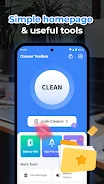
Cleaner Toolbox is a handy tool designed to keep your Android device clean and efficient. It helps maintain your phone in excellent condition, ensuring swift performance and effectiveness. One of its key features is the junk cleaner, which allows you to remove cache files, temporary files, and leftover data from your phone, freeing up memory and enhancing productivity.
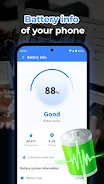
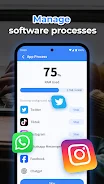
Additionally, the app provides crucial battery information, helping you monitor the charge and health of your battery. Another valuable feature is the app uninstaller, which enables you to select and remove applications that you no longer use, thus reclaiming storage space on your device. The app also lets you view and manage background processes, helping to reduce system load and improve overall performance.
This application is beneficial for all Android users looking to keep their devices clean and organized. Whether you have an older phone that requires optimization or a new device you want to maintain in good condition, Cleaner Toolbox will be a reliable assistant. The user-friendly interface makes it easy for anyone to navigate and utilize its features effectively.
In summary, Cleaner Toolbox is a simple yet powerful tool that helps you maintain optimal performance for your Android device, ensuring smooth operation and freshness. Regular use of this app can significantly enhance your device's efficiency and prolong its lifespan.
Availability and source
- Check the version, Android compatibility, developer and source in the app details block.
- Open the official app page on Google Play if a link is available.
- Before installing, review app permissions and use only sources you trust.
Frequently asked questions
What features does Cleaner Toolbox offer?
Cleaner Toolbox offers junk cleaning, battery information, app uninstallation, and background process management.
Is Cleaner Toolbox easy to use?
Yes, Cleaner Toolbox has a user-friendly interface suitable for all Android users.
Can Cleaner Toolbox improve my device's performance?
Absolutely! It helps free up memory and optimize your device for better performance.
Is Cleaner Toolbox free to download?
Yes, Cleaner Toolbox is available for free download on Android.





No comments yet. Be the first!
Leave a comment