
Desh Tamil Keyboard
Open in Google PlayApp details
- Updated
- 16.10.2026
- Category
- Tools
- Compatibility
- ANDROID
- Package name
com.clusterdev.tamilkeyboard- Developer
- Desh Keyboard
- Source
- Official Google Play page
Desh Tamil Keyboard is the most popular add-on for typing in Tamil and English on your Android device. It provides a convenient and fast typing experience, allowing users to communicate effectively in their native language within any messenger or app on their smartphone. The add-on is designed to save time compared to traditional Indian keyboards and other manual typing programs.
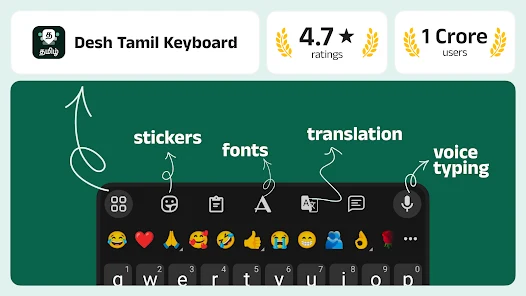
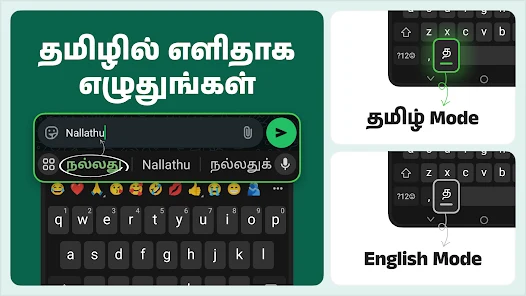
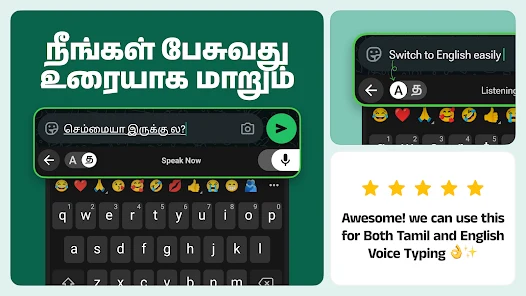
The software supports various text input methods, making it versatile for different user preferences. You can use the Tanglish mode, where English words are automatically converted to Tamil, or use voice input to convert speech to text. There is also a handwriting recognition feature: simply draw letters on the screen.
For full control, an alphabetical typing mode is provided, along with the ability to easily disable Tamil for fast pure English text entry. The language key, located to the left of the space bar, allows instant switching between languages. Long pressing this key opens access to different input modes.
To make your chats brighter and more emotional, numerous extended features are offered. You can add stylish stickers for WhatsApp and other messengers, create your own stickers from photos, or use text stickers for stylish message formatting. A convenient emoji bar is available, along with the ability to view and share stickers from your chats.
The clipboard feature allows for easy copying and pasting of text.
How to install the app
- Check the version, Android compatibility, developer and source in the app details block.
- Open the official app page on Google Play if a link is available.
- Before installing, review app permissions and use only sources you trust.
Frequently asked questions
How does Tanglish mode work in Desh Tamil Keyboard?
Tanglish mode automatically converts English words typed on the keyboard into Tamil text, allowing for seamless bilingual communication without switching input modes manually.
Can I use voice input with this Android keyboard app?
Yes, the app supports voice input functionality, which allows you to convert your speech into text quickly and accurately for faster messaging.
What gestures are supported for professional users?
Professional users can swipe left or right across the spacebar to move the cursor, or swipe down from the delete key to quickly clear text, enhancing typing efficiency.
Does the app support custom stickers and emojis?
Users can add stylish stickers for WhatsApp, create custom stickers from photos, use text stickers, and access a convenient emoji bar for expressive messaging.






No comments yet. Be the first!