
Document Scanner - PDF Creator
Open in Google PlayApp details
- Updated
- 18.05.2026
- Category
- Tools
- Compatibility
- ANDROID
- Package name
com.cv.docscanner- Developer
- LUFICK TECHNOLOGY PRIVATE LIMITED
- Source
- Official Google Play page
Are you tired of juggling multiple documents in a single day? Whether your schedule is perfectly planned or unexpected scanning needs arise suddenly, finding the right tool can be a true test of patience. This portable document scanner app transforms your smartphone into a full-fledged office, allowing you to digitize papers anytime and anywhere.
It is the perfect solution for professionals and students who need to manage physical documents efficiently without carrying bulky scanners. The application is equipped with numerous features that make scanned documents look professional and accurate. You can easily adjust image quality either automatically or manually to ensure the best results.
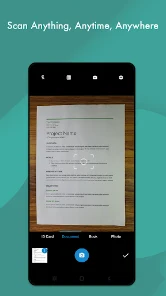
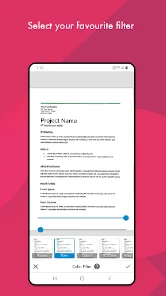
Special attention is given to smart edge detection, which perfectly isolates text from the background. This ensures that your documents are crisp, clear, and ready for professional use, eliminating the need for manual cropping or alignment adjustments. To optimize your images, the app offers various processing modes including black and white, bright, color, and dark.
Thanks to these tools, your scans turn into high-quality, readable PDF files that preserve the original look of your documents. The interface is intuitive, making it easy to navigate through settings and choose the best mode for your specific document type, whether it is a colorful flyer or a black-and-white contract. File management is another crucial aspect of this app.
How to install the app
- Check the version, Android compatibility, developer and source in the app details block.
- Open the official app page on Google Play if a link is available.
- Before installing, review app permissions and use only sources you trust.
Frequently asked questions
Can I scan multiple documents into a single PDF?
Yes, the app allows you to scan multiple pages and combine them into a single, organized PDF file for easy sharing and storage.
Does the app support cloud storage integration?
Absolutely, you can upload your scanned documents directly to popular cloud services like Google Drive and Dropbox for secure backup.
Is there a way to read and create QR codes?
Yes, the app includes extended technology to read existing barcodes and QR codes, as well as create your own custom codes for sharing.
How does the edge detection feature work?
The smart edge detection automatically identifies the boundaries of your document, ensuring clean cuts and professional-looking scans every time.

No comments yet. Be the first!