
Easy Task
DownloadApp details
- Version
- 1.0.0
- Updated
- 31.10.2026
- Category
- Miscellaneous
- Compatibility
- Android
- Package name
com.marothiatechs.easytask- Developer
- Marothia Techs
- Source
- Official Google Play page
Easy Task is a robust and powerful addition to your productivity toolkit, specifically designed for teams that want to unify their work, communication, and people in one place. Instead of switching between dozens of different programs, you can manage all processes in a single, cohesive ecosystem. This application allows you to create a dedicated workspace, invite colleagues, and start effective collaboration immediately.
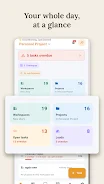
It streamlines the workflow by centralizing data and interactions, reducing the friction often associated with managing multiple apps simultaneously. A key feature of Easy Task is its support for multiple workspaces. You can create separate environments for different departments, clients, or projects and switch between them with a single tap.
For added convenience, the app allows you to pin your most frequently used spaces to the top of the list, ensuring quick access to your primary projects. This organization helps in maintaining clarity and focus, allowing team members to dive straight into their tasks without navigating through complex menus or searching for the right context. Within each space, tasks are organized by project.
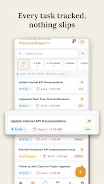
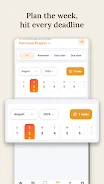
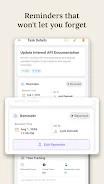
You can create tasks, assign them to team members, and set deadlines. The status of each task is tracked from the moment of assignment until full completion. Thanks to powerful search and filter functions, you can find any task in just a few seconds.
How to install the app
- Check the version, Android compatibility, developer and source in the app details block.
- Open the Downloads tab and use the official source or an available catalog link.
- Before installing, review app permissions and use only sources you trust.
Frequently asked questions
What is Easy Task APK used for?
Easy Task is a comprehensive application designed for managing projects, tasks, and teams. It allows users to create workspaces, assign tasks, set deadlines, and track progress efficiently. Additionally, it includes tools for lead management and client tracking, making it suitable for both internal team collaboration and external customer relationship management. The app centralizes communication and file sharing to keep all project-related information in one place.
Does Easy Task support multiple workspaces?
Yes, Easy Task supports multiple workspaces. You can create separate environments for different departments, clients, or projects. This feature allows you to organize your work logically and switch between different contexts with a single tap. You can also pin your most frequently used spaces to the top of the list for quick access, ensuring that you can navigate your various projects without losing focus or wasting time searching for the right environment.
How does communication work in Easy Task?
Communication is built directly into the interface of Easy Task. You can discuss specific tasks in a dedicated message stream, which ensures that the context of the conversation is preserved and not lost. The app allows you to share photos, documents, and other files easily within the chat. Features like quick replies, read receipts, and online status indicators help you stay connected with your team and ensure that important updates are seen promptly.
Can I use Easy Task for lead tracking?
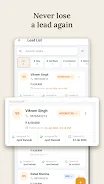
Yes, Easy Task offers tools for lead tracking. You can organize a client database, assign leads to specific managers, and track them from the first contact through to conversion. The app includes full-text search functionality, allowing you to quickly find the necessary client information. This makes it a versatile tool for sales teams and managers who need to manage both internal projects and external client relationships within a single platform.
Similar apps





No comments yet. Be the first!