

Flare Cleaner
Open in Google PlaySpaceAPK does not provide APK files. A listed Google Play link is a reference: check the store for availability, version, price and paid features. The catalog version is not offered as a downloadable file.
App details
- Updated
- 29.09.2026
- Category
- Tools
- Compatibility
- ANDROID
- Package name
com.flare.cleaner.storage- Developer
- Online Radio & Music Apps
- Source
- Google Play reference
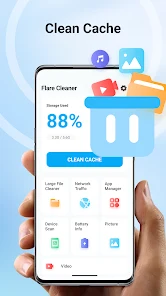
Flare Cleaner is a practical utility tool designed to help you manage your Android device’s internal storage and organize your files efficiently. This application provides the essential insights you need to identify exactly what is taking up space on your phone, allowing you to reclaim valuable storage by removing unnecessary files. By offering a clear overview of your device's data usage, Flare Cleaner ensures that your Android experience remains smooth and responsive without clutter slowing you down.
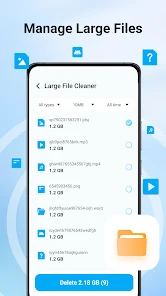
The Large File Manager feature addresses the common issue of storage notifications caused by large videos, high-resolution photos, and old archives. Flare Cleaner makes it easy to find these space-hogging files through smart sorting options. You can organize files by size, file type such as Video, Audio, or Document, or by the date they were added.
This detailed review capability allows you to preview files before deciding to remove them, ensuring you do not delete anything important while freeing up significant space with bulk management. Picture management is another core strength of the application, as photos can quickly clutter your gallery and consume storage over time. The tool automatically detects pictures across your device and groups them in one convenient location for easy access.
Availability and source
- Check the version, Android compatibility, developer and source in the app details block.
- Open the official app page on Google Play if a link is available.
- Before installing, review app permissions and use only sources you trust.
Frequently asked questions
How does Flare Cleaner help free up storage space on Android?
Flare Cleaner identifies large files, old pictures, and unused applications that consume storage, allowing you to review and delete them to reclaim space.
Can I sort files by size or type in Flare Cleaner?
Yes, the Large File Manager allows you to sort files by size, type such as Video or Audio, or by date to quickly locate space-consuming data.
Does Flare Cleaner help manage installed applications?
Yes, the Application Manager lets you view all installed apps, sort them by storage usage, and uninstall unused applications directly from the interface.
Is Flare Cleaner safe to use for deleting photos and files?
Flare Cleaner allows you to preview files before deletion, ensuring you do not accidentally remove important data while organizing your gallery and storage.








No comments yet. Be the first!
Leave a comment