

Gallery
DownloadApp details
- Version
- 1.9.4.930218541
- Updated
- 12.10.2026
- Category
- Photo editors
- Compatibility
- Android 8.0+
- Package name
com.google.android.apps.photosgo- Source
- Official Google Play page
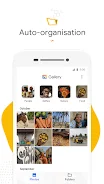
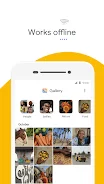
Discover the Gallery app, a smart, lightweight, and fast gallery for photos and videos developed by Google. This app helps you conveniently organize your memories and enhance their appearance. One of its standout features is automatic organization, which groups your photos into categories like People, Selfies, Nature, Animals, Documents, Videos, and Movies every night.
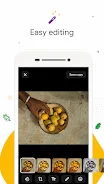
This way, you can find the images you need faster, saving you time on searches. Gallery also includes auto-enhancement tools that allow you to improve your photos with just a tap. The auto-enhance feature makes your shots look even better, ensuring your memories are captured beautifully.
With support for folders and SD cards, you can organize your photos in a way that suits you best. The app makes it easy to view, copy, and move files to SD cards, providing flexibility with your storage. Performance is another strong point of Gallery, as it has a small file size that frees up space for your photos.
It consumes minimal device memory, ensuring your phone runs smoothly without slowing down. Moreover, Gallery is optimized for offline use, allowing you to store and manage all your photos and videos without using mobile data. This app is perfect for anyone looking to keep their memories organized and easily editable.
Gallery is a simple and convenient tool for those who value speed and efficiency. With its features, you can enjoy your photos and videos effortlessly, making it a must-have for any Android user.
How to install the app
- Check the version, Android compatibility, developer and source in the app details block.
- Open the Downloads tab and use the official source or an available catalog link.
- Before installing, review app permissions and use only sources you trust.
Frequently asked questions
What is the Gallery app?
Gallery is a photo and video management app developed by Google, designed for easy organization and enhancement.
Can I use Gallery offline?
Yes, Gallery is optimized for offline use, allowing you to manage your media without internet connectivity.
How does auto-enhancement work in Gallery?
The auto-enhancement feature improves your photos with just a single tap, making them look better instantly.
Is Gallery suitable for SD cards?
Absolutely! Gallery supports SD cards, allowing you to easily view, copy, and move files.




No comments yet. Be the first!