

Google Voice
DownloadApp details
- Version
- 2026.07.19.950299329
- Updated
- 13.10.2026
- Compatibility
- Android 10+
- Package name
com.google.android.apps.googlevoice- Source
- Official Google Play page
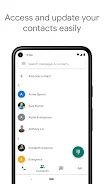
Google Voice is a convenient service that provides you with a phone number for calls, text messages, and voicemail. Available on both smartphones and computers, it syncs your data across all devices, allowing you to use the app at the office, at home, or while traveling. Key features of Google Voice include automatic spam filtering, the ability to block unwanted numbers, and personalized settings for call forwarding, text messages, and voicemail.
You can also save and search your calls, messages, and voicemails, making communication management even easier. This app is ideal for users looking to optimize their communication, reduce international call costs, and manage their messages from various devices. Google Voice is particularly suited for those who frequently communicate with people outside the US, as it offers competitive rates for international calls.
Ultimately, Google Voice is a reliable and versatile tool for managing your calls and messages, ensuring convenience and efficiency in communication. Let your conversations be simple, and your message management effortless!
How to install the app
- Check the version, Android compatibility, developer and source in the app details block.
- Open the Downloads tab and use the official source or an available catalog link.
- Before installing, review app permissions and use only sources you trust.
Frequently asked questions
What is Google Voice?
Google Voice is a service that provides a phone number for calls, texts, and voicemail.
Can I use Google Voice on multiple devices?
Yes, Google Voice syncs across smartphones and computers.
Does Google Voice help reduce international call costs?
Yes, it offers competitive rates for international calls.
Is spam filtering available in Google Voice?
Yes, Google Voice includes automatic spam filtering.
Similar apps












No comments yet. Be the first!