

Hi Music:Offline Music Player
DownloadApp details
- Version
- 1.4.8.6
- Updated
- 16.10.2026
- Category
- Music
- Compatibility
- Android 6.0+
- Package name
com.freemusic.himusic.yt- Source
- Official Google Play page
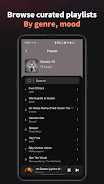
Hi Music is the ultimate app for music lovers, allowing you to enjoy your favorite tracks anytime and anywhere. With a vibrant interface and a continuously expanding library, Hi Music caters to the diverse needs of its users. The app offers a vast collection of millions of songs across various genres, including classical, country, electronic, and experimental music, all available for free.
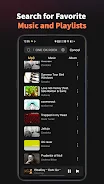
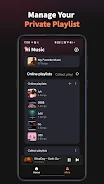
You can easily search for any song in seconds using the efficient search function, and explore weekly rankings, top charts, and the latest playlists tailored just for you. One of the standout features of Hi Music is its playlist functionality. Users can create unlimited online and local playlists, manage their collections, and even import their existing playlists by signing into their accounts.
The app supports multiple sound qualities, allowing you to choose between smooth, standard, or high audio depending on your preference. Additionally, you can enjoy customizable playback modes, including single loop, random play, and loop play, providing a personalized listening experience. Hi Music also offers a floating video player for background play, ensuring your music continues to play while you navigate other apps.
For those who like to unwind with music, the app includes a sleep timer, allowing you to fall asleep without worrying about stopping the music manually. If you encounter any issues, the support team is just a click away in the app's feedback section. Embrace the joy of music with Hi Music, where every song is just a tap away.
This app is not just a music player; it's a gateway to a world of melodies and rhythms that enrich your life. Download Hi Music today and transform the way you enjoy music on your Android device!
How to install the app
- Check the version, Android compatibility, developer and source in the app details block.
- Open the Downloads tab and use the official source or an available catalog link.
- Before installing, review app permissions and use only sources you trust.
Frequently asked questions
Is Hi Music free to use?
Yes, Hi Music allows you to enjoy millions of songs for free.
Can I create my own playlists?
Absolutely! You can create unlimited online and local playlists.
What audio quality options are available?
Hi Music offers smooth, standard, and high audio quality options.
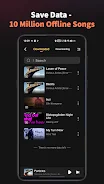
Does Hi Music work offline?
Yes, you can listen to your downloaded songs offline.
Similar apps








No comments yet. Be the first!