

Hub App: Invites & RSVPs
Open in Google PlaySpaceAPK does not provide APK files. A listed Google Play link is a reference: check the store for availability, version, price and paid features. The catalog version is not offered as a downloadable file.
App details
- Recorded version
- 3.1.6
- Updated
- 18.09.2026
- Category
- Miscellaneous
- Compatibility
- Android 7.0+
- Package name
com.thehub- Source
- Google Play reference
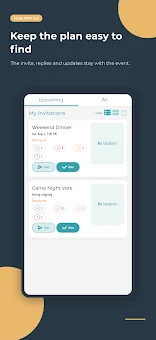
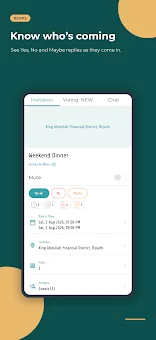
Planning group events often turns into a chaotic mess of text messages, missed updates, and conflicting schedules. Hub App simplifies this process by providing a dedicated space for every event, keeping guest lists, votes, and the latest details in one central location. Instead of scrolling through endless chat threads, you can check the plan instantly and ensure everyone stays informed without the confusion.
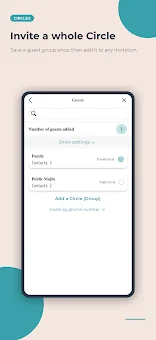
This Android app is designed to streamline coordination for parties, dinners, and casual hangouts. One of the standout features is the ability to save guest lists as Circles. You can organize contacts into family, friends, classmates, or teams, making it easy to reuse these groups for future events.
Circles can be private, shared, or public, and shared circles allow for co-administrators. This means you can manage large groups efficiently, adding or removing individual guests as plans evolve, while maintaining a clean and organized directory for all your social gatherings. Hub App offers flexibility in how you create invitations.
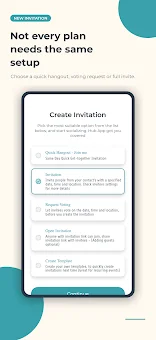
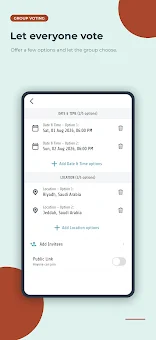
Use Quick Hangouts for casual, low-effort plans, or create detailed Invitations with dates, times, locations, photos, and descriptions. You can also send Requests for Voting, create Open Invitations, or start from saved Templates.
Availability and source
- Check the version, Android compatibility, developer and source in the app details block.
- Open the official app page on Google Play if a link is available.
- Before installing, review app permissions and use only sources you trust.
Frequently asked questions
What is Hub App used for?
Hub App is an invitation and RSVP application designed for planning events with groups. It helps organize guest lists, manage votes, and keep all event details in one place to avoid confusion.
How do Circles work in Hub App?
Circles allow you to save and reuse guest lists for future events. You can create private, shared, or public circles, add co-admins, and easily select a circle when creating a new invitation.
Can I use polls to decide on event details?
Yes, Hub App lets you create polls for dates, times, or locations. Guests can vote on options, making it easier to reach a consensus and finalize plans without endless messaging.
Is Hub App available in languages other than English?
Yes, Hub App supports both English and Arabic languages, making it accessible for a wider range of users who need to coordinate events in their preferred language.
Similar apps









No comments yet. Be the first!
Leave a comment