

InstaShare : Share Instantly
DownloadApp details
- Version
- 1.06
- Updated
- 08.10.2026
- Category
- Tools
- Compatibility
- Android
- Package name
dev.instashare.app- Source
- Official Google Play page
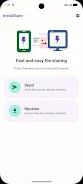
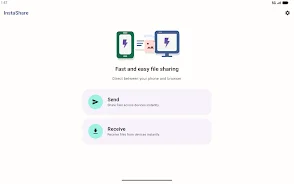
InstaShare is a user-friendly application that allows you to quickly and securely share files between your phone and computer without the need for registration or additional software. With data encryption, you can be assured that your information remains confidential. This app is perfect for anyone who frequently exchanges files with their computer, including students, professionals, freelancers, and those who value their online privacy.
You can transfer various types of files such as photos, videos, documents, and more, all while ensuring a high level of security. Files are never uploaded to servers; they are transferred directly between devices, making the process both fast and secure. One of the standout features of InstaShare is the ability to send multiple files in succession without having to reconnect each time.
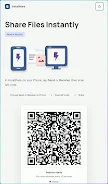
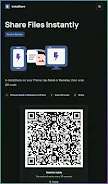
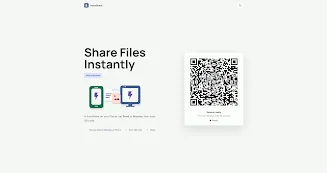
This makes it incredibly convenient for users who need to share large amounts of data quickly. The app uses QR codes for direct file transfers, simplifying the sharing process even further. You won't need to worry about complicated setups or lengthy procedures; just scan the QR code and start sharing.
InstaShare is an intuitive and secure way to transfer files between your mobile device and computer. It ensures speed and confidentiality, so you can focus on what matters most without sacrificing your privacy. Whether you’re a student sharing assignments or a professional exchanging important documents, InstaShare is your reliable assistant for seamless data sharing.
In conclusion, with InstaShare, you can confidently share files knowing that your information is safe and the transfer process is hassle-free. Download the app today and experience a new level of convenience in file sharing.
How to install the app
- Check the version, Android compatibility, developer and source in the app details block.
- Open the Downloads tab and use the official source or an available catalog link.
- Before installing, review app permissions and use only sources you trust.
Frequently asked questions
What types of files can I share with InstaShare?
You can share photos, videos, documents, and more.
Is my data secure when using InstaShare?
Yes, InstaShare uses data encryption to keep your information confidential.
Do I need to install additional software to use InstaShare?
No, InstaShare works without the need for additional software or registration.
How do I transfer files using InstaShare?
You can transfer files directly by scanning a QR code.




No comments yet. Be the first!