

KiMouse: Bluetooth Trackpad
DownloadApp details
- Version
- 1.4.2
- Updated
- 17.10.2026
- Category
- Tools
- Compatibility
- Android
- Package name
com.kimouse- Source
- Official Google Play page
KiMouse: Bluetooth Trackpad is a revolutionary application that transforms your Android device into a genuine Bluetooth mouse and keyboard for any computer. No rooting, additional adapters, or software installations are required on your computer. KiMouse registers your phone as a standard Bluetooth HID device, enabling you to connect it to your computer just like a regular mouse.
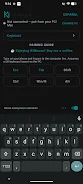
This functionality extends to Smart TVs, media boxes, mini PCs, and consoles—essentially any device that supports Bluetooth mice. The key features of KiMouse include an accurate trackpad: use one finger to move the cursor, two fingers for scrolling, and other gestures for navigation. The keyboard function allows you to type on your phone, with text appearing instantly on your computer, supporting all major key combinations.
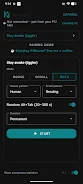
Additionally, the 'Stay Active' feature prevents your computer from sleeping during downloads or long reading sessions. You can also easily switch between multiple computers that you have connected. KiMouse is ideal for anyone who frequently works with a computer, uses media devices, or simply wants to control their device comfortably from a distance.
It’s the perfect solution for presentations, video watching, or just for a comfortable user experience. Overall, KiMouse is a convenient and functional app that offers ease of use and a wide range of capabilities without the need for extra hardware or software. It works seamlessly with Windows, macOS, and Linux, requires no WiFi, supports multiple languages, and includes a built-in guide for connecting.
How to install the app
- Check the version, Android compatibility, developer and source in the app details block.
- Open the Downloads tab and use the official source or an available catalog link.
- Before installing, review app permissions and use only sources you trust.
Frequently asked questions
What does KiMouse do?
KiMouse turns your Android phone into a Bluetooth mouse and keyboard for computers and other devices.
Do I need to root my device to use KiMouse?
No, KiMouse does not require rooting your Android device.
Can KiMouse connect to multiple devices?
Yes, you can easily switch between multiple devices connected to KiMouse.
Which operating systems are supported?
KiMouse works with Windows, macOS, and Linux.
Similar apps









No comments yet. Be the first!