

Klaviatura ai.type PLUS
Open in Google PlaySpaceAPK does not provide APK files. A listed Google Play link is a reference: check the store for availability, version, price and paid features. The catalog version is not offered as a downloadable file.
App details
- Recorded version
- 9.6.0.6
- Updated
- 22.06.2021
- Category
- Arcade
- Compatibility
- Android 3.2
- Package name
com.aitype.android.p- Source
- Google Play reference
Klaviatura ai.type PLUS is a sophisticated input application designed specifically for Android devices, offering a significantly enhanced and personalized text entry experience. This tool is particularly beneficial for users who frequently type on tablets or smartphones, ensuring that every keystroke feels natural and efficient. The developers have focused on creating a robust environment that adapts to individual writing styles, making the process of composing messages, emails, and documents smoother and more enjoyable.
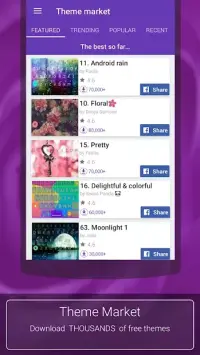
One of the standout features of this keyboard is the ability to create custom layouts, allowing users to tailor the interface to their specific needs. You can choose from a variety of themes, colors, and fonts to match your personal aesthetic preferences. This level of customization not only improves visual appeal but also contributes to greater comfort during extended typing sessions, reducing eye strain and making the overall experience more pleasant.
The application utilizes advanced artificial intelligence to predict the next word as you type, significantly increasing typing speed and accuracy. It also includes automatic spelling correction to help you maintain high-quality text without constant manual review.
Availability and source
- Check the version, Android compatibility, developer and source in the app details block.
- Open the official app page on Google Play if a link is available.
- Before installing, review app permissions and use only sources you trust.
Frequently asked questions
Does Klaviatura ai.type PLUS support custom themes?
Yes, users can create custom layouts and choose from various themes, colors, and fonts to personalize their keyboard appearance and improve comfort.
Is there voice support in this keyboard app?
Yes, the application includes voice support that speaks words aloud as you type, which can be enabled or disabled according to your preference.
Can I adjust the keyboard size on Android?
Users can easily change the size of the keyboard to find the optimal variant that fits their device screen and personal typing comfort needs.
Does the app correct spelling automatically?
Yes, Klaviatura ai.type PLUS features automatic spelling correction to help ensure accurate text entry without requiring constant manual review.
Similar apps





No comments yet. Be the first!