

ACalendar Calendar
Open in Google PlayApp details
- Version
- 2.9.5 (2009500)
- Updated
- 29.11.2021
- Category
- Android applications
- Package name
org.withouthat.acalendarplus- Developer
- Tapir Apps GmbH
- Source
- Official Google Play page
ACalendar Calendar is a versatile scheduling application designed specifically for users who need a reliable tool to organize their daily lives on Android devices. This app serves as a comprehensive solution for both professional and personal time management, allowing users to seamlessly plan work meetings, appointments, and personal activities in one unified interface. By consolidating all your calendar needs into a single, easy-to-use platform, ACalendar Calendar helps reduce stress and ensures that you stay on top of your schedule without missing important details.
One of the standout features of ACalendar Calendar is its robust reminder system. The application allows users to set precise notifications for upcoming events, ensuring that you are alerted at the exact right time. Whether it is a crucial business deadline or a personal appointment, the app ensures that you never forget important tasks.
This functionality is particularly useful for busy professionals who juggle multiple responsibilities throughout the day, as it provides a reliable safety net for time-sensitive commitments. The visual experience of ACalendar Calendar is highly customizable to suit individual preferences. Users can adjust the appearance of the calendar to match their aesthetic tastes or improve readability.
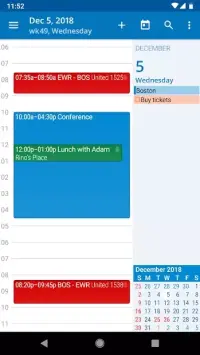
The app supports a tile-based view, which is ideal for displaying multiple tasks on a single day.
How to install the app
- Check the version, Android compatibility, developer and source in the app details block.
- Open the official app page on Google Play if a link is available.
- Before installing, review app permissions and use only sources you trust.
Frequently asked questions
What is the main purpose of ACalendar Calendar?
ACalendar Calendar is designed to help Android users plan and organize both work and personal tasks efficiently, ensuring no important appointment is missed.
Does ACalendar Calendar support reminders?
Yes, the app includes a notification system that alerts users at the specified time, helping them stay on track with their scheduled activities and deadlines.
How does the tile view work in this app?
The tile view displays tasks in a grid format for a specific day, allowing users to see all scheduled activities at once and manage their time more effectively.
Can I customize the appearance of the calendar?
Absolutely, users can adjust the calendar's visual settings to match their preferences, including switching between different views and adding detailed daily descriptions.






Version history
Below are the catalog pages found for this app. When a source changelog is available, it will be added separately.
No comments yet. Be the first!