
AirDroid: molodec'kij. dostup i fajli
Open in Google PlayApp details
- Version
- 4.3.12.0 (40312001)
- Updated
- 09.12.2021
- Category
- Tools
- Package name
com.sand.airdroid- Developer
- SAND STUDIO
- Source
- Official Google Play page
AirDroid is a versatile application designed to streamline your workflow by connecting your Android device with other gadgets, including personal computers. This utility allows you to manage files, messages, and notifications across multiple devices seamlessly. Whether you are working from home or on the go, AirDroid ensures that your data is always within reach, providing a unified experience that bridges the gap between your mobile phone and desktop environment.
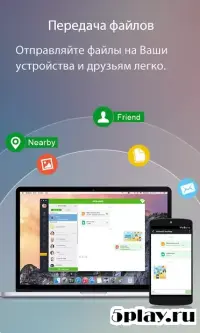
The core functionality of AirDroid revolves around efficient file transfer and management. You can send and receive files of any size without losing quality or encountering complex restrictions. The app supports a wide range of file types, making it an essential tool for professionals and casual users alike.
With its intuitive interface, navigating through your documents, photos, and media becomes a straightforward process, saving you valuable time during your daily tasks. One of the standout features of AirDroid is its ability to mirror your smartphone screen onto your computer. This capability is particularly useful for presentations, tutorials, or simply backing up your data.
You can control your device directly from your PC, allowing for precise interactions and easier management of apps and settings. This remote control feature enhances productivity by giving you greater flexibility in how you interact with your mobile device. AirDroid also excels in communication management.
How to install the app
- Check the version, Android compatibility, developer and source in the app details block.
- Open the official app page on Google Play if a link is available.
- Before installing, review app permissions and use only sources you trust.
Frequently asked questions
How does AirDroid connect to my computer?
AirDroid connects to your computer via Wi-Fi or USB cable, allowing you to transfer files and manage apps remotely with ease.
Can I use AirDroid to mirror my screen?
Yes, AirDroid allows you to mirror your Android screen to your PC, making it easy to control your device from a larger display.
Is AirDroid free to use?
AirDroid offers a free version with basic features, while premium plans unlock advanced capabilities like larger file transfers and more storage.
Does AirDroid work with all Android devices?
AirDroid is compatible with most Android devices running Android 4.0 or higher, ensuring broad accessibility for users.
Similar apps
Version history
Below are the catalog pages found for this app. When a source changelog is available, it will be added separately.
No comments yet. Be the first!