
Alli360 by Kids360
DownloadApp details
- Version
- 2.83.0
- Updated
- 30.10.2026
- Category
- Miscellaneous
- Compatibility
- Android 7.0+
- Package name
app.kids360.kid- Developer
- MINDCARE LAB LTD
- Source
- Official Google Play page
Alli360 is a specialized companion application designed to help parents effectively manage their children's screen time and digital habits on Android devices. It serves as a vital addition to the broader Kids360 parental control ecosystem, offering a streamlined way to monitor and restrict app usage directly from the child's device. By installing this APK on the child's smartphone, parents gain a powerful tool to balance entertainment with education, ensuring that gaming and social media do not interfere with sleep, homework, or family time.
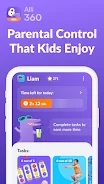
The app works in tandem with the main parent app, allowing for synchronized settings and real-time updates across devices. The core functionality of Alli360 revolves around setting precise time limits for specific applications and games. Parents can define daily allowances for popular apps, such as social media platforms, video streaming services, or online games.
Once the allocated time expires, the designated apps become inaccessible until the next day or until the parent grants an extension. This feature helps prevent excessive screen time and encourages children to engage in other activities. Additionally, users can create custom schedules for learning and rest periods, ensuring that the device is used appropriately during school hours or bedtime.
Another key feature is the ability to completely block specific apps or categories of content.
How to install the app
- Check the version, Android compatibility, developer and source in the app details block.
- Open the Downloads tab and use the official source or an available catalog link.
- Before installing, review app permissions and use only sources you trust.
Frequently asked questions
How does Alli360 help manage children's screen time?
Alli360 allows parents to set daily time limits for specific apps and games on the child's Android device. Once the time limit is reached, the apps become inaccessible, helping to reduce excessive screen time and encourage other activities.
Can I block certain apps while keeping others open?
Yes, parents can choose to completely block specific apps or categories while keeping essential communication channels like calls and messages open. This ensures the child can be reached for urgent matters without violating screen time rules.
Is Alli360 installed with the child's knowledge?
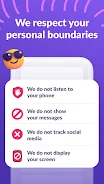
Yes, Alli360 cannot be installed on the child's phone without their knowledge. The app requires the child's consent for installation, which helps build trust and transparency in the parent-child relationship regarding digital monitoring.
How do I set up Alli360 on my child's device?
To set up Alli360, install the main Kids360 app on your phone and the Alli360 app on your child's device. Exchange a code between the two devices to establish a secure connection, allowing you to manage settings and monitor usage from your phone.







No comments yet. Be the first!