
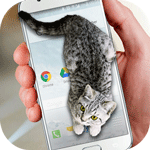
Cat Walks in Phone Cute Joke
DownloadApp details
- Version
- 1.1
- Updated
- 16.10.2026
- Category
- Arcade
- Compatibility
- Android 2.3
- Package name
com.just4funmobile.catwalksinphone- Source
- Official Google Play page
Experience the delight of a virtual feline companion with Cat Walks in Phone Cute Joke, a charming Android application designed to bring a touch of whimsy to your daily routine. This unique app places an adorable cat directly onto your device's screen, creating an interactive and entertaining visual experience that is both cute and engaging. It serves as a perfect digital pet for those who enjoy lighthearted animations without the commitment of caring for a real animal.
Once you install the APK on your Android device, the experience begins immediately. Upon the first launch, you are prompted to press a specific button to activate the cat, which then appears on your desktop or home screen. The feline companion moves around naturally, exploring the virtual space and capturing your attention with its playful behavior.
This simple interaction makes it an ideal distraction or mood booster during work breaks or moments of boredom. The application offers several customization options to suit your preferences. You can adjust the position of the cat on the screen, ensuring it does not obstruct important icons or notifications.
Additionally, you have the control to modify the size of the character, making it larger for better visibility or smaller for a subtle presence. These settings allow you to tailor the experience to your device's layout and personal taste. Audio is another key feature of this delightful app.
How to install the app
- Check the version, Android compatibility, developer and source in the app details block.
- Open the Downloads tab and use the official source or an available catalog link.
- Before installing, review app permissions and use only sources you trust.
Frequently asked questions
How do I start the cat on my screen?
After installing the APK on your Android device, simply press the designated button on the first launch to activate the virtual cat on your desktop.
Can I change the size of the cat?
Yes, the app includes a menu where you can adjust the size of the cat, allowing you to make it larger or smaller to fit your screen preferences perfectly.
Is there sound in the app?
The app features sound effects that can be toggled on or off via the settings menu, allowing you to enjoy the audio or keep it silent depending on your environment.
Does the app consume a lot of battery?
The application is designed to be lightweight and runs efficiently on Android devices, ensuring minimal battery drain while providing a smooth and engaging visual experience.
Similar apps





No comments yet. Be the first!