

CodeAssist - Android IDE
DownloadApp details
- Version
- 3.10.0
- Updated
- 17.10.2026
- Category
- Tools
- Compatibility
- Android 12+
- Package name
com.tyron.code- Source
- Official Google Play page
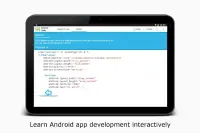
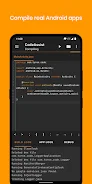
CodeAssist is a powerful integrated development environment (IDE) tailored for Android app development. With support for Java, Kotlin, and XML, this app simplifies the coding process, making it accessible even on smaller screens. Unlike traditional IDEs, CodeAssist offers a user-friendly interface that streamlines programming tasks, allowing you to focus on building your app rather than struggling with the coding environment.
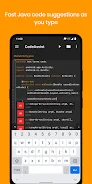
The smooth code editor allows for easy adjustments, and features like zooming, shortcut bars, and undo-redo functionality enhance your coding experience. One of the standout features of CodeAssist is its intelligent auto code completion, which helps you write code efficiently by suggesting the next lines of code without lag. This feature currently supports Java, making it easier for developers to maintain their flow.
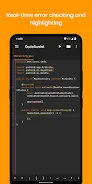
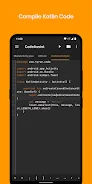
Additionally, real-time error highlighting ensures that you can catch mistakes as you code, reducing debugging time significantly. The design capabilities of CodeAssist allow you to preview layouts instantly, eliminating the need for constant recompilation. Compiling your project is a breeze; with just a single click, you can build your APK or AAB file while continuing to work on other tasks.
The integrated library manager simplifies dependency management, automatically adding sub-imports and eliminating the hassle of dealing with build.gradle files. Furthermore, CodeAssist supports Java 8 features, enabling the use of modern programming constructs. As an open-source project, CodeAssist encourages community involvement, and its source code is available on GitHub.
Future updates promise exciting features such as a layout editor and Git integration. For any assistance, users can reach out on the community Discord server for support and collaboration.
How to install the app
- Check the version, Android compatibility, developer and source in the app details block.
- Open the Downloads tab and use the official source or an available catalog link.
- Before installing, review app permissions and use only sources you trust.
Frequently asked questions
What programming languages does CodeAssist support?
CodeAssist supports Java, Kotlin, and XML for Android app development.
Can I compile my project in CodeAssist?
Yes, you can compile your project and build APK or AAB files with a single click.
Is CodeAssist open source?
Yes, the source code for CodeAssist is available on GitHub.
How does auto code completion work?
The auto code completion feature suggests code as you type, helping you code faster without lag.
Similar apps







No comments yet. Be the first!