

Comic Reader Mobi
Open in Google PlayApp details
- Updated
- 02.04.2020
- Category
- Android applications
- Package name
mobi.comicreaderplatform- Source
- Official Google Play page
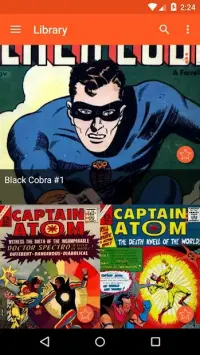
Comic Reader Mobi is a specialized Android application designed for enthusiasts of manga and fantastic comics who prefer reading digital files directly on their devices. This unique tool supports multiple popular formats including CBZ and CBR, ensuring that users can easily access a wide variety of comic libraries without needing to convert files into different structures. It also offers the ability to view standard JPEG images within regular archives, making it a versatile solution for various types of digital reading materials.
The core feature of this app is its innovative text magnification system, which enhances the reading experience significantly. When you tap on a line of text, the app zooms in on that specific line rather than the entire page. This allows for much clearer reading of smaller fonts or detailed dialogue without losing the context of the surrounding artwork.
Users can disable this feature to use traditional pinch-to-zoom methods if they prefer a more conventional approach to navigating comic pages. One of the most engaging aspects of Comic Reader Mobi is its special page-turning animation. As you swipe your fingers across the touchscreen, the page begins to curl realistically, creating a sense of reading a physical comic book.
This visual effect adds immersion to the digital experience, making the transition between scenes feel natural and satisfying.
How to install the app
- Check the version, Android compatibility, developer and source in the app details block.
- Open the official app page on Google Play if a link is available.
- Before installing, review app permissions and use only sources you trust.
Frequently asked questions
What file formats does Comic Reader Mobi support?
The application supports multiple formats including CBZ, CBR, and standard JPEG images found within regular archives, making it versatile for various comic libraries.
How does the text magnification feature work?
When you tap on a specific line of text, the app zooms in only on that line, allowing for clearer reading of dialogue without needing to zoom out to see the entire page layout.
Does Comic Reader Mobi use a lot of memory?
Yes, the app requires significant RAM. Opening a twenty-megabyte book file can consume nearly four hundred megabytes of memory, so sufficient device resources are recommended.
What is the page-turning animation like?
The app features a realistic page-turning effect where the page curls as you swipe your finger across the screen, mimicking the experience of reading a physical comic book.



No comments yet. Be the first!