
Congressa
DownloadApp details
- Version
- 1.5.1
- Updated
- 03.10.2026
- Category
- Miscellaneous
- Compatibility
- Android
- Package name
sk.sikuta.congressa- Developer
- Ján Šikuta
- Source
- Official Google Play page
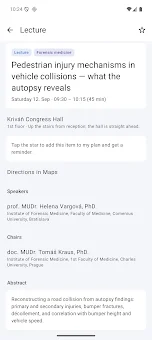
Congressa is a sophisticated personal navigator application designed specifically for conferences and professional events. Its standout feature is full autonomy, allowing the app to function completely offline without requiring an active internet connection. This makes it an indispensable tool for attendees who want to stay organized without worrying about data usage or network availability in crowded venues.
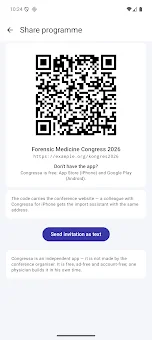
The application is lightweight and efficient, ensuring smooth performance on a wide range of Android devices while providing a seamless user experience for managing complex schedules. Getting started with Congressa is incredibly simple and flexible. You can load the conference data by scanning a QR code, clicking a direct link, visiting the organizer’s website, or importing a PDF file.
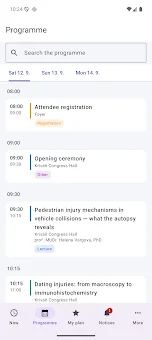
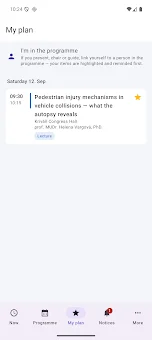
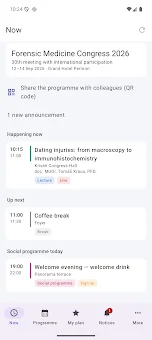
Once the data is downloaded, your entire schedule, including speaker details, poster sessions, and venue locations, is available offline. The app clearly displays what is happening right now, what is scheduled for later, and sends timely reminders for important events, ensuring you never miss a key presentation or networking opportunity during the event. The interface is structured for maximum efficiency and ease of use.
The Now tab shows current and upcoming activities at a glance, while the Program tab organizes content by day with detailed information about speakers and authors.
How to install the app
- Check the version, Android compatibility, developer and source in the app details block.
- Open the Downloads tab and use the official source or an available catalog link.
- Before installing, review app permissions and use only sources you trust.
Frequently asked questions
Does Congressa require an internet connection to work?
No, Congressa is designed to work fully offline. Once you download the conference data via QR code, link, or PDF, all schedules and details are available without an internet connection.
How can I add a conference to Congressa?
You can add a conference by scanning a QR code, clicking a download link, visiting the organizer's website, or importing a PDF file containing the event data.
Can I customize the reminders for events in Congressa?
Yes, you can set reminders for 5, 10, 15, 30, or 60 minutes before an event, or specify a custom time from one minute to twelve hours in advance of the session.
Does Congressa support searching for speakers by name?
Yes, the app includes a powerful search function that supports searching by surname, even within specific blocks, and correctly handles diacritical characters for accurate results.
Similar apps




No comments yet. Be the first!