
Contacts
DownloadApp details
- Version
- 7.6
- Updated
- 13.10.2026
- Category
- Tools
- Compatibility
- Android 7.0+
- Package name
com.contacts.number.add.sim.phone.recent.details- Source
- Official Google Play page
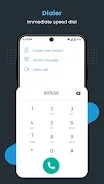
The Contacts app is a convenient contact manager and calling application for Android, designed to enhance your communication experience. Whether you are making calls, organizing contacts, or sending messages, Contacts provides seamless and intuitive functionality. One of its key features is organized contacts, allowing you to keep your contacts orderly and easily accessible.
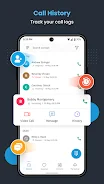
You can group them by categories such as family, friends, and work. Additionally, you can add and edit contact details, including names, phone numbers, email addresses, and profile pictures. Another notable feature is the call log, which enables you to view a comprehensive history of your incoming, outgoing, and missed calls.
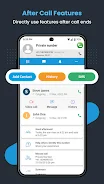
The Contacts app offers detailed information about each call, including duration and time, allowing you to track your communication history effectively. After a call, you will have access to app features that appear immediately after each call—incoming, outgoing, or missed. This functionality displays call details and integrates relevant features, allowing users to quickly save contacts, send messages, or schedule events.
The app also allows you to mark frequently contacted numbers as favorites for quick access. Your favorite contacts will appear at the top of your list, making them easier to find. Additionally, Contacts automatically merges duplicate contacts and backs up your contact book in the cloud.
This ensures that you never lose important contact information, even if you change devices. Ideal for anyone seeking a reliable tool for managing contacts and calls, Contacts offers an intuitive interface, advanced features, and customization options. This app will become an indispensable assistant in your daily communication.
Try the Contacts app today and enjoy simplicity and efficiency in your interactions!
How to install the app
- Check the version, Android compatibility, developer and source in the app details block.
- Open the Downloads tab and use the official source or an available catalog link.
- Before installing, review app permissions and use only sources you trust.
Frequently asked questions
What features does the Contacts app offer?
The Contacts app offers organized contacts, call logs, favorite contacts, and cloud backup.
Is the Contacts app free to download?
Yes, the Contacts app is free to download on Android devices.
Can I merge duplicate contacts?
Yes, the Contacts app automatically merges duplicate contacts for you.
How can I access my favorite contacts?
Your favorite contacts are listed at the top for quick and easy access.





No comments yet. Be the first!