

Extended Controls
Open in Google PlayApp details
- Version
- 6.1.2
- Updated
- 17.11.2021
- Category
- Arcade
- Compatibility
- Android 4.0
- Package name
com.extendedcontrols- Source
- Official Google Play page
Extended Controls is a powerful alternative to the standard Power Control widget, designed for Android users who want deeper customization and broader functionality. This utility app goes beyond basic toggles, offering a comprehensive suite of quick settings that can be easily accessed from your home screen. It is the perfect solution for those who find the default control center too limited or cumbersome to use during daily activities.
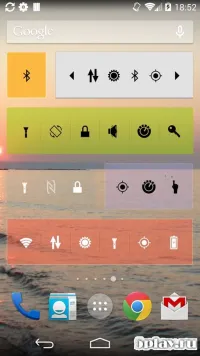
With this app, you can manage essential connectivity options with a single tap. Quickly toggle Wi-Fi connections, switch between mobile data networks, and adjust volume levels without navigating through multiple menus. You can also control the screen brightness, activate GPS for navigation, and enable Bluetooth for pairing with accessories.
Additionally, the app allows you to create a Wi-Fi hotspot, giving you full control over your device's internet sharing capabilities. One of the standout features of Extended Controls is its extensive customization options. You can choose from various graphic designs for your widgets, allowing you to match the app's appearance with your device's theme.
Customize the background color, set transparency levels, and add dividers between icons to organize your settings logically. This level of personalization ensures that your control panel remains both functional and aesthetically pleasing. The app is optimized for performance, ensuring that your quick settings remain responsive and reliable.
How to install the app
- Check the version, Android compatibility, developer and source in the app details block.
- Open the official app page on Google Play if a link is available.
- Before installing, review app permissions and use only sources you trust.
Frequently asked questions
What is Extended Controls for Android?
Extended Controls is an Android app that serves as an advanced alternative to the standard Power Control widget, offering broader functionality and customization options for quick settings.
Can I customize the appearance of the widgets?
Yes, you can customize the graphic design of the widgets, including changing the background color, adjusting transparency levels, and adding dividers between icons for better organization.
Does Extended Controls require root access?
No, Extended Controls does not require root access, making it compatible with a wide range of Android devices and versions without needing special permissions.
What features does the app include?
The app includes toggles for Wi-Fi, mobile data, volume, screen brightness, GPS, Bluetooth, and Wi-Fi hotspot creation, all accessible from a customizable home screen widget.



No comments yet. Be the first!