

FBReader Premium
DownloadApp details
- Version
- 3.0.22
- Updated
- 18.10.2026
- Category
- Arcade
- Compatibility
- Android 4.0
- Package name
org.geometerplus.zlibrary.ui.android- Source
- Official Google Play page
FBReader Premium stands out as a versatile and powerful application designed for avid readers who want to manage and enjoy their digital libraries with ease. This robust e-book reader supports a wide array of text formats, including RTF, FB2, TXT, and HTML, ensuring that you can access almost any document you own without needing to convert files first. Whether you are reading classic literature or modern articles, the app handles various file types seamlessly, making it an essential tool for your Android device.
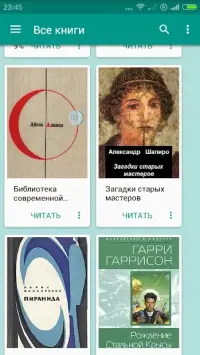
One of the key features of FBReader Premium is its advanced organizational capabilities. If you have a large collection of books stored on your device, you can easily sort them by title, author, or genre. This functionality helps you keep your library tidy and ensures that you can find your favorite titles quickly.
You can also mark books as favorites, add them to a watchlist, and copy text to the clipboard for easy reference or sharing with others. The app offers extensive customization options to suit your reading preferences. You can adjust the text size, font style, and background colors to create the perfect reading environment for any lighting condition.
Additionally, FBReader Premium supports bookmarks, allowing you to save your progress and return exactly where you left off.
How to install the app
- Check the version, Android compatibility, developer and source in the app details block.
- Open the Downloads tab and use the official source or an available catalog link.
- Before installing, review app permissions and use only sources you trust.
Frequently asked questions
What file formats does FBReader Premium support?
FBReader Premium supports a wide range of text formats including RTF, FB2, TXT, and HTML, allowing you to read various types of documents seamlessly on your Android device.
Can I customize the reading experience in FBReader Premium?
Yes, you can customize text size, font style, and background colors. The app also supports touch-optimized navigation and allows you to adjust the interface to your preference.
How does FBReader Premium help organize my book library?
You can sort your books by title, author, or genre. The app also lets you mark favorites, add books to a watchlist, and copy text to the clipboard for easy reference.
Is FBReader Premium suitable for large collections?
Absolutely. FBReader Premium is designed to handle large libraries efficiently, with features like sorting, searching, and bookmarking to keep your reading organized and accessible.
Similar apps











Version history
Below are the catalog pages found for this app. When a source changelog is available, it will be added separately.
No comments yet. Be the first!