
FileRecover: Restore & QR
DownloadApp details
- Version
- 1.0
- Updated
- 16.10.2026
- Category
- Tools
- Compatibility
- Android
- Package name
com.t9s.filerecoverpro- Source
- Official Google Play page
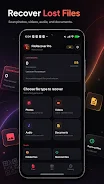
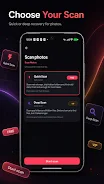
FileRecover: Restore & QR is a versatile tool designed for file recovery, memory cleaning, QR code scanning, barcode reading, and creating a secure storage space for Android devices. This application becomes an essential assistant for anyone looking to organize their data and recover lost information. With its advanced features, you can scan for photos, videos, audio files, documents, APK/ZIP files, and even hidden files.
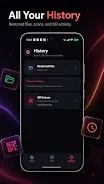
The app offers both quick and deep scanning modes, ensuring thorough analysis of your storage. One of the standout features is the ability to preview images, videos, audio, text, PDFs, and document information before recovery. Users can restore selected files back to their device's memory, while also accessing a history of recovered files that can be searched, sorted, shared, or deleted.
Additionally, the app provides memory cleaning options to help manage large files, duplicate photos/videos, and old downloads effectively. FileRecover also includes a QR code scanner and a barcode reader, capable of detecting links, phone numbers, email addresses, SMS, Wi-Fi, contacts, locations, text, product barcodes, and QR codes for bank transfers. The built-in QR code generator allows users to save, share, and maintain a local history of generated codes, enhancing its utility.
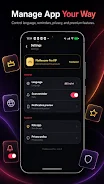
For added privacy, the app features a secure storage option that lets you move selected files to a safe local memory area. With reminders for smart scanning and support for multiple languages, FileRecover is designed for easy and private file management on your device. It’s important to note that recovery results depend on the availability of files in your device's memory, and the app does not guarantee the recovery of permanently deleted or overwritten data.
How to install the app
- Check the version, Android compatibility, developer and source in the app details block.
- Open the Downloads tab and use the official source or an available catalog link.
- Before installing, review app permissions and use only sources you trust.
Frequently asked questions
What types of files can FileRecover recover?
FileRecover can recover photos, videos, audio files, documents, and APK/ZIP files.
Is there a guarantee for file recovery?
No, recovery results depend on file availability and cannot guarantee restoration of deleted or overwritten data.
Does FileRecover support QR code scanning?
Yes, it includes a QR code scanner and barcode reader for various types of data.
Can I clean my device's memory with this app?
Yes, FileRecover offers memory cleaning features for large files and duplicates.




No comments yet. Be the first!