
Google Drive
DownloadApp details
- Updated
- 27.10.2026
- Category
- Tools
- Compatibility
- ANDROID
- Package name
com.google.android.apps.docs- Developer
- Google LLC
- Source
- Official Google Play page
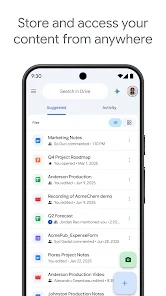
Google Drive is the premier cloud storage service designed for saving, organizing, and collaborating on files and folders from any device, anywhere you go. This application allows you to securely store your data and access it at any time, ensuring your important documents are always within reach. You can edit and save over 100 types of files, including PDF documents, Microsoft Office files, video clips, and other common formats, making it a versatile tool for both personal and professional use.
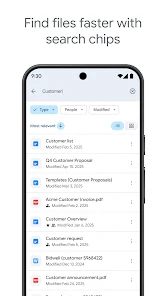
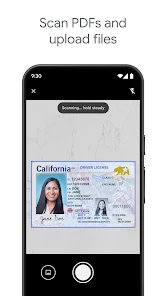
The convenient scanning feature lets you upload paper documents by using your device camera, simplifying the digitization of physical records. An intelligent search system helps you quickly find needed materials by name or even by content inside the files. You can easily filter files by type, date of last change, and other parameters to optimize your workflow.
Shared work becomes maximally efficient as you can send files and folders to other users, set access rights, and receive notifications about important activity. For those who work on the go, the app offers the ability to view content in offline mode even without an internet connection. Android tablet users appreciate the improved interface with screen sharing and file dragging features, which facilitate multitasking.
How to install the app
- Check the version, Android compatibility, developer and source in the app details block.
- Open the Downloads tab and use the official source or an available catalog link.
- Before installing, review app permissions and use only sources you trust.
Frequently asked questions
How much free storage does Google Drive provide?
Each Google account is provided with 15 GB of free storage space. This storage quota is shared across Google Drive, Gmail, and Google Photos, allowing users to manage their documents and media efficiently without immediate need for a paid upgrade.
Can I use Google Drive offline on Android?
Yes, the application supports offline mode, allowing you to view and edit content even without an active internet connection. This feature is particularly useful for professionals who work on the go or in areas with unstable network coverage.
What file formats are supported for editing?
Users can edit and save over 100 types of files, including popular formats like PDF documents, Microsoft Office files, and various video clips. The app also supports scanning paper documents directly via the device camera for easy digitization.
Similar apps





No comments yet. Be the first!