
Google Go
DownloadApp details
- Updated
- 24.10.2026
- Category
- Tools
- Compatibility
- ANDROID
- Package name
com.google.android.apps.searchlite- Developer
- Google LLC
- Source
- Official Google Play page
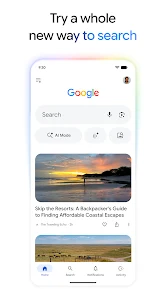
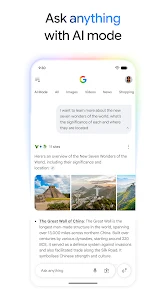
Experience the evolution of search with Google Go, a lightweight and powerful application designed to help you discover answers, explore your interests, and ask any question in a way that suits you best. This updated app brings together a smart search experience powered by artificial intelligence, including a new AI mode, Google Lens integration, live search capabilities, and other modern features that make information retrieval faster and more intuitive than ever before. The AI mode allows you to receive intelligent answers to complex questions using text, voice, or photos.
You can ask clarifying questions and follow links for deeper learning on any topic. With Google Lens, you can find products to buy, search for similar images, or refine your search using words, such as changing quantities. You can also identify plants and animals, translate text in real-time, solve math problems, and find image sources with ease.
Live Search provides answers during conversations using voice and camera technology. AI summaries give you a concise overview of key information with links to sources. If you forget the name of a song, simply hum the melody, and Google will help you find it.
The Discover section keeps you updated on events by offering personalized news and articles tailored to your interests. The intelligent search experience expands along with your interests, offering suggestions and supporting text and video searches.
How to install the app
- Check the version, Android compatibility, developer and source in the app details block.
- Open the Downloads tab and use the official source or an available catalog link.
- Before installing, review app permissions and use only sources you trust.
Frequently asked questions
What is the main advantage of using Google Go?
Google Go offers a lightweight, fast, and data-efficient search experience with integrated AI features, Google Lens, and live search capabilities for quick answers.
Does Google Go support voice and image search?
Yes, it supports voice search, image search via Google Lens, and live search that provides answers during conversations using your device camera and microphone.
How does the AI mode work in Google Go?
The AI mode uses advanced models to provide intelligent answers to complex questions through text, voice, or photos, allowing for deeper exploration of topics.
Is my search history private and secure?
Yes, connections are encrypted, and you can easily delete your search history with a single tap, ensuring your privacy is protected with convenient settings.
Similar apps






No comments yet. Be the first!