
Google Tasks
DownloadApp details
- Updated
- 24.10.2026
- Category
- Tools
- Compatibility
- ANDROID
- Package name
com.google.android.apps.tasks- Developer
- Google LLC
- Source
- Official Google Play page
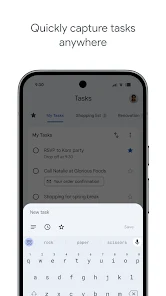
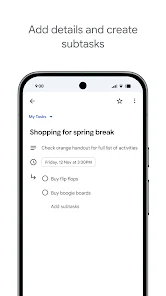
Google Tasks is a streamlined productivity application designed to help you organize your daily life and professional responsibilities with ease. By integrating seamlessly into your existing workflow, it allows you to capture ideas, create to-do lists, and manage projects without the clutter of complex interfaces. The app is perfect for users who want a clean, distraction-free environment to focus on what truly matters, ensuring that nothing slips through the cracks during your busy day.
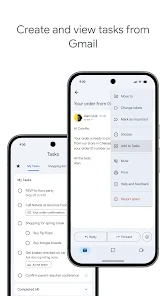
One of the key features of Google Tasks is its deep integration with Gmail. You can create tasks directly from your email inbox, automatically linking the task to the original message for quick context. This functionality saves time by eliminating the need to manually type details or switch between apps.
Whether you are managing work projects or personal errands, this integration ensures that your tasks are always connected to the relevant information, making follow-ups faster and more efficient. The application supports synchronization across all your devices, ensuring that your data is always up to date whether you are on your phone, tablet, or computer. You can create lists for different areas of your life, such as work, home, or shopping, and prioritize items by dragging them into order or marking high-priority tasks with a star.
How to install the app
- Check the version, Android compatibility, developer and source in the app details block.
- Open the Downloads tab and use the official source or an available catalog link.
- Before installing, review app permissions and use only sources you trust.
Frequently asked questions
How does Google Tasks integrate with Gmail?
You can create tasks directly from your Gmail inbox, linking them to specific emails for easy reference and context when you need to complete them later.
Can I use Google Tasks on multiple devices?
Yes, Google Tasks syncs automatically across all your devices, including Android phones, tablets, and web browsers, keeping your lists up to date everywhere.
Is Google Tasks free to use?
Google Tasks is completely free to use for all users, offering robust features like lists, reminders, and integrations without any subscription fees or hidden costs.
How do I prioritize tasks in the app?
You can prioritize tasks by dragging them to reorder your lists or by marking important items with a star, making them stand out for quick access when needed.




No comments yet. Be the first!