

Luma AI: 3D Capture
DownloadApp details
- Version
- 0.5.7
- Updated
- 09.10.2026
- Category
- Photo editors
- Compatibility
- Android
- Package name
ai.lumalabs.polar- Source
- Official Google Play page
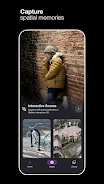
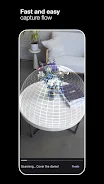
Luma AI: 3D Capture is an innovative application that allows users to create stunning 3D images using artificial intelligence, all from the convenience of their smartphone. Capture moments, products, landscapes, and people anywhere, then share these interactive scenes with anyone online. With incredible detail, reflections, and lighting, you can create 3D scenes that invite others into your space.
This app is perfect for designers, game developers, marketers, and anyone looking to preserve their memories in a new format. Forget about traditional 3D; with Luma AI, you can shoot products in 3D and embed them on your website, showcasing them as they appear in real life. Capture high-quality 3D models of gaming objects and transfer them into Blender, Unity, or any other 3D engine.
Export realistic NeRFs and Gaussian Splats into Unreal, Unity, and other supported tools. Luma AI: 3D Capture opens up new creative possibilities, enabling everyone to create unique content and share their ideas with the world. Discover new horizons with artificial intelligence and craft unmatched 3D objects right from your phone!
How to install the app
- Check the version, Android compatibility, developer and source in the app details block.
- Open the Downloads tab and use the official source or an available catalog link.
- Before installing, review app permissions and use only sources you trust.
Frequently asked questions
What is Luma AI: 3D Capture?
Luma AI: 3D Capture is an app that allows you to create 3D images using AI on your smartphone.
Can I share my 3D creations?
Yes, you can share your interactive 3D scenes with others online.
Is Luma AI suitable for professionals?
Absolutely! It is ideal for designers, game developers, and marketers.
What platforms can I export to?
You can export to Blender, Unity, Unreal, and other supported tools.




No comments yet. Be the first!