
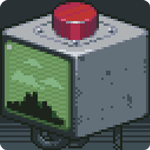
Please, Do not Touch Anything
Open in Google PlayApp details
- Version
- 1.1.1259
- Updated
- 07.07.2021
- Category
- Arcade
- Compatibility
- Android 2.3
- Package name
com.fourquarters.pleasedonttouchanything- Source
- Official Google Play page
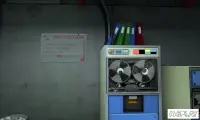
Please, Do not Touch Anything is a clever logic puzzle game for Android devices, beautifully executed in a nostalgic old-school pixel art style. At first glance, it may seem like there is nothing to do in the game, but the developers have carefully thought out the gameplay, organizing it into 25 logical quests. The story follows a main character who finds himself in a room with a panel of devices that raises suspicion just by its appearance.
Suddenly, the robot needs to make a decision and asks the user to figure everything out here, but under no circumstances should you touch anything. Curiosity takes over, and the most interesting part begins. Every corner and every object in Please, Do not Touch Anything hides some secret.
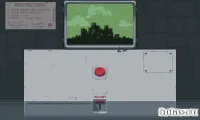
You need to press a button and observe what happens on a large screen located behind the control panel. Some combinations and actions can completely throw the game off balance, after which it automatically restarts. If your gadget starts vibrating motor-like and the screen says everything is broken, do not panic, as this is just the game's reaction to guessing the riddle incorrectly.
In some scenarios, the control point may completely fail, and for such cases, a special Restart button is provided to restart the installation. Alongside this useful feature, you can notice many points that serve as a progress indicator, showing how far you have come in the game.
How to install the app
- Check the version, Android compatibility, developer and source in the app details block.
- Open the official app page on Google Play if a link is available.
- Before installing, review app permissions and use only sources you trust.
Frequently asked questions
What is the main objective in Please, Do not Touch Anything?
The main goal is to solve 25 logical quests by observing screens and guessing riddles without touching the devices, which can cause the game to restart.
Does the game use pixel art graphics?
Yes, the game is executed in a nostalgic old-school pixel art style, providing a retro visual experience for Android users.
How do I track my progress in the game?
Completed stages are marked with a yellow color, serving as a visual indicator of your progress through the various levels and quests.
What happens if I touch the wrong object?
If you make the wrong move, the game may restart automatically or display a message indicating that everything is broken, requiring you to use the restart feature.
Similar apps





No comments yet. Be the first!