

Prompt Agent
DownloadApp details
- Version
- 2.7.4
- Updated
- 18.10.2026
- Category
- Tools
- Compatibility
- Android
- Package name
com.arcavirtual.promptagent- Source
- Official Google Play page
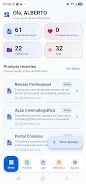
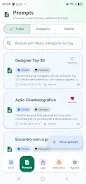
Prompt Agent is an innovative library of prompts designed specifically for Android users, transforming great ideas into clear, organized, and reusable instructions for AI tools. This application allows you to search for content, organize your library, and reuse the best prompts across your favorite AI services. With a user-friendly interface, you can explore a well-organized library of prompts, searching by title, description, or tags.
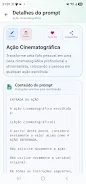
You can also browse through categories and themes to find exactly what you need. One of the standout features of Prompt Agent is the ability to save your favorite prompts for quick access. You can create and edit prompts complete with titles, descriptions, content, categories, tags, statuses, and usage notes.
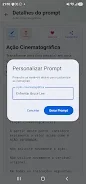
The app also lets you customize templates by filling in variables like `{{name}}` and `{{theme}}`, making it easier to tailor your prompts to specific needs. Additionally, you can listen to content aloud using Android's speech functionality, share text with other installed apps, and even translate and optimize prompts with AI assistance. For convenience, you can export and import your library in JSON format, and check your balance and resources that utilize credits.
Signing in with your Google account allows for data synchronization and access to account-related resources. While the app can be browsed as a guest, creating content and utilizing AI tools may require a Google account login. Some operations may need credits and prior cost confirmation.
Prompt Agent does not execute prompts or replace AI tools; instead, it assists in preparing, refining, organizing, and sharing instructions that can be employed in AI services of your choice. Keep your best prompts at hand and turn ideas into clear, consistent, and easily reusable instructions with Prompt Agent.
How to install the app
- Check the version, Android compatibility, developer and source in the app details block.
- Open the Downloads tab and use the official source or an available catalog link.
- Before installing, review app permissions and use only sources you trust.
Frequently asked questions
What is Prompt Agent?
Prompt Agent is an Android app that helps organize and optimize prompts for AI tools.
Can I use Prompt Agent without a Google account?
Yes, but some features require a Google account for full access.
How can I create and edit prompts?
You can create and edit prompts by adding titles, descriptions, and other details within the app.
Is there a cost associated with using Prompt Agent?
Some operations may require credits and prior confirmation of costs.
Similar apps










No comments yet. Be the first!