

Purr — Rootless Resolution Cha
DownloadApp details
- Version
- 1.3
- Updated
- 14.10.2026
- Category
- Tools
- Compatibility
- Android
- Package name
com.draco.purr- Source
- Official Google Play page
Introducing Purr, the innovative resolution changer designed for Android devices that requires no root access. Utilizing Android SDK reflection, Purr allows users to access hidden APIs to seamlessly adjust their phone screen's resolution. By granting a special permission through ADB, you can easily enhance your viewing experience without the risks associated with rooting your device.
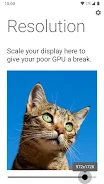
Changing your display resolution can significantly impact performance. Lowering the resolution can reduce the strain on your GPU, making your device run smoother, especially for resource-intensive applications and games. Purr is particularly useful for games that are optimized for a standard 16:9 aspect ratio, ensuring a better fit and improved gameplay experience on widescreen displays.
One of the standout features of Purr is its sophisticated DPI calculation mechanism. The app intelligently determines the optimal DPI for any new resolution, eliminating the guesswork often associated with manual adjustments. By calculating diagonal pixels and applying a fair divisor, Purr ensures that the visual quality remains consistent, providing a near-identical scale when resolutions are changed.
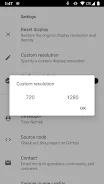
Additionally, Purr offers a verification process for resolutions to ensure compatibility before application, acting as a safety net for users. You can also specify custom resolutions directly in the settings menu, tailoring your display to your unique preferences. Plus, enjoy the delightful sight of a cute cat each time you launch the app, adding a touch of charm to your experience.
How to install the app
- Check the version, Android compatibility, developer and source in the app details block.
- Open the Downloads tab and use the official source or an available catalog link.
- Before installing, review app permissions and use only sources you trust.
Frequently asked questions
Do I need to root my device to use Purr?
No, Purr works without requiring root access.
How does Purr change the resolution?
It uses Android SDK reflection to access hidden APIs.
Can I set custom resolutions?
Yes, custom resolutions can be specified in the settings menu.
Is there a risk of applying incompatible resolutions?
Purr verifies resolutions for compatibility before applying them.
Similar apps








No comments yet. Be the first!