
Ringtone Switcher
Open in Google PlayApp details
- Version
- 1.0.26
- Updated
- 16.09.2026
- Category
- Tools
- Compatibility
- Android
- Package name
anchun.li.ringtoneswitcher- Source
- Official Google Play page
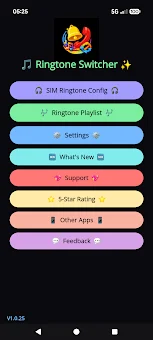
Ringtone Switcher is a smart local tool for automatically changing ringtones, created specifically for Android users. Choose and import your favorite songs saved on your device, and the app will automatically switch to the next melody after each phone call. This is an ideal solution for those who want to create a personalized playlist of incoming ringtones without being limited by system settings.
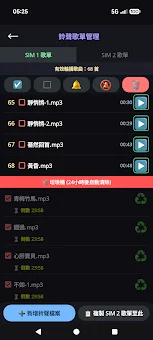
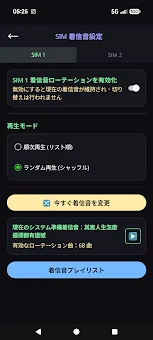
Key features allow you to fully control your audio experience. You can freely import local music, supporting basic formats such as MP3, M4A, OGG, and WAV. For smartphones with dual SIM cards, there is independent playlist management for each line or synchronization with one tap.
The app supports both sequential playback and random mode with a guarantee of no repeats. Managing your collection has become easier thanks to an extended playlist manager with a file health check function and data loss protection. Deleted tracks are kept in the trash for 24 hours, allowing you to easily restore them with one tap.
The app automatically starts when the device is turned on, plays the initial melody, and displays the current status in the status bar. Changing melodies happens in the background even in sleep or energy-saving mode. The main advantage is 100% local operation without sending data to the cloud.
No account registration is required; all settings and music remain on your phone.
How to install the app
- Check the version, Android compatibility, developer and source in the app details block.
- Open the official app page on Google Play if a link is available.
- Before installing, review app permissions and use only sources you trust.
Frequently asked questions
Does Ringtone Switcher require an internet connection to work?
No, Ringtone Switcher operates 100% locally on your Android device. It does not send your music or settings to the cloud, ensuring that all your data remains private and accessible even without an active internet connection.
What audio formats are supported for importing ringtones?
The app supports basic audio formats including MP3, M4A, OGG, and WAV. You can freely import these local music files from your device storage to create custom playlists for different contacts or call types.
How does the app handle deleted playlist items?
Deleted tracks are kept in a trash bin for 24 hours, allowing you to easily restore them with one tap if you deleted them by mistake. This feature helps protect your data and prevents accidental loss of your favorite ringtones.
Can I use different playlists for dual SIM cards?
Yes, for smartphones with dual SIM cards, the app offers independent playlist management for each line. You can also synchronize settings with one tap, making it easy to customize ringtone experiences for both SIMs separately.


No comments yet. Be the first!