

ScanBizCards Lite - Business C
DownloadApp details
- Version
- 7.6.9
- Updated
- 17.10.2026
- Category
- Miscellaneous
- Compatibility
- Android 8.0+
- Package name
com.scanbizcards- Source
- Official Google Play page
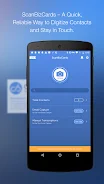
ScanBizCards Lite is your ultimate solution for managing business cards right from your Android device. Tired of cluttered card collections? This versatile app allows you to organize and store all your business cards in one convenient location.
With features like a new OCR engine, scanning is now five times faster than before, making it easier than ever to digitize your contacts. You can even batch scan multiple cards, saving you time and effort. The app offers a unique business card scanning experience, allowing you to either scan a card directly or submit it for a 100% accurate human transcription.
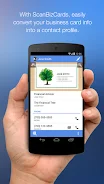
Integration with CRM platforms such as Salesforce and SugarCRM facilitates seamless export of your contacts, making it an ideal tool for sales professionals. Additionally, ScanBizCards Lite can scan conference badges, eliminating the need for bulky scanners at events. Transform your business cards into digital contacts in just four simple steps: snap a picture, scan, review the results, and save to your address book.
You can even capture contacts from email signatures, streamlining the process of adding new leads. With support for 22 languages, the app ensures accessibility for users around the globe. The app is not just about scanning; it also allows you to edit contact information side-by-side with the card image, create personal notes, and organize cards with custom folder names.
You can search your collection, share cards via email, and back up your data to Google Drive, ensuring your contacts are always safe. While the Lite version has some limitations, such as a cap on exports to CRM systems, it still provides an exceptional business card management experience. Download ScanBizCards Lite today and take control of your networking efforts like never before.
How to install the app
- Check the version, Android compatibility, developer and source in the app details block.
- Open the Downloads tab and use the official source or an available catalog link.
- Before installing, review app permissions and use only sources you trust.
Frequently asked questions
What features does ScanBizCards Lite offer?
ScanBizCards Lite allows you to scan, organize, and export business cards, including batch scanning and CRM integration.
Can I scan conference badges with this app?
Yes, ScanBizCards Lite can scan conference badges, making it easy to capture contacts at events.
Is there a limit on exports to CRM platforms?
Yes, the Lite version has limitations on the number of exports to Salesforce and SugarCRM.
How does the OCR feature work?
The OCR feature allows you to quickly digitize business cards with high accuracy, now faster than ever.
Similar apps









No comments yet. Be the first!