
Shuffle Medley Maker
Open in Google PlayApp details
- Version
- 7.0
- Updated
- 03.11.2026
- Category
- Music
- Compatibility
- Android
- Package name
com.aistudio.shufflemedley.xrvtzq- Developer
- NextVision Dev
- Source
- Official Google Play page
Shuffle Medley Maker is an intuitive and powerful application designed for creating unique audio medleys on your Android device. This app allows you to easily transform standard sound files into captivating musical compositions. Thanks to modern data processing algorithms, the program guarantees a sharp result even for users without technical preparation.
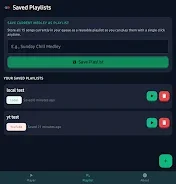
The interface is user-friendly, enabling you to start mixing in just a few seconds without needing to master complex technical skills or understand various audio formats. The main advantage of this tool is the Smart Shuffling function, which intelligently mixes your files to create fresh and unpredictable medleys every time you launch the process. This ensures that each new composition is unique and interesting, avoiding repetition.
You will enjoy smooth transitions where selected audio clips blend seamlessly into one another, creating a unified musical flow without harsh cuts or jarring sounds. This feature makes the experience highly engaging for casual listeners and content creators alike. Version 7.0 brings an optimized interface and improved operational stability, making the medley creation process as fast and pleasant as possible.
You have full control over the output file configuration, allowing you to adapt the result to your individual requirements.
How to install the app
- Check the version, Android compatibility, developer and source in the app details block.
- Open the official app page on Google Play if a link is available.
- Before installing, review app permissions and use only sources you trust.
Frequently asked questions
What is the main feature of Shuffle Medley Maker?
The main feature is Smart Shuffling, which intelligently mixes audio files to create unique and unpredictable medleys without repetition every time you run the process.
Do I need technical skills to use this app?
No, the app has a user-friendly interface that allows you to start mixing in seconds. You do not need to master complex technical skills or understand various audio formats to get a basic result.
Is this app suitable for professional editors?
Yes, it is suitable for both amateurs and professional editors who need a rapid audio material prototype. It offers full control over output file configuration to adapt to individual requirements.
Similar apps





No comments yet. Be the first!