

Sweety VPN
DownloadApp details
- Version
- 1.0.1
- Updated
- 25.10.2026
- Category
- Tools
- Compatibility
- Android
- Package name
com.sweety.vpn- Source
- Official Google Play page
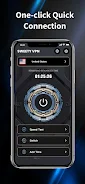
Sweety VPN is a convenient and reliable Android application designed to allow users to easily install and manage device-level VPN connections. Built for those who value simplicity and transparency in the connection process, the app features an intuitive interface. To activate protection, users simply select an available node and tap the connect button.
The Android system will then request permission to create the connection, and upon confirmation, the VPN session begins immediately. During operation, the program displays a persistent notification in the system tray, allowing users to instantly view the connection status and terminate the session with a single touch. This ensures full control over traffic and data security without the need to constantly open the app itself.
Users can connect or disconnect after receiving Android permission and easily switch between available nodes to optimize speed or access content. The application provides important information about the current IP address and basic geolocation data, allowing users to verify if the VPN is working effectively. An integrated speed test tool shows the performance of the active connection.
For a deeper understanding of the network environment, the program displays Wi-Fi details and other connection parameters.
How to install the app
- Check the version, Android compatibility, developer and source in the app details block.
- Open the Downloads tab and use the official source or an available catalog link.
- Before installing, review app permissions and use only sources you trust.
Frequently asked questions
How do I connect to a VPN in Sweety APK?
Select an available node from the list and tap the connect button. Confirm the Android permission request to start the session.
Does Sweety VPN show my current IP address?
Yes, the app displays your current IP address and basic geolocation data so you can verify the VPN is working correctly.
Can I test my connection speed with this app?
Yes, Sweety VPN includes a built-in speed test tool to show the performance of your active connection.
Similar apps










No comments yet. Be the first!