
VLC for Android
Open in Google PlayApp details
- Version
- 3.7.2 Beta 1 (13070115)
- Updated
- 20.11.2021
- Category
- Android applications
- Package name
org.videolan.vlc- Developer
- Videolabs
- Source
- Official Google Play page
VLC for Android stands as a robust and versatile media player application, designed to handle a wide array of video and audio formats with ease. This popular addition to the Android ecosystem supports nearly all common media types, ensuring that users can play their favorite content without needing additional codecs or converters. The application is renowned for its stability and extensive feature set, making it a top choice for both casual viewers and media enthusiasts who demand reliability and performance.
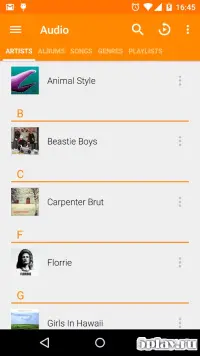
The interface of VLC for Android is modern and minimalist, providing a clean and intuitive user experience. The color palette primarily features orange and white tones, creating a visually appealing and uncluttered look. The start screen displays found files, allowing users to quickly access their media library.
This design choice ensures that navigation is straightforward, enabling users to launch their videos or music with minimal effort, even on devices with smaller screens. One of the key strengths of VLC for Android is its ability to play a vast number of formats, including MKV, MP4, AVI, and OGG, among others. This versatility means that users do not need to worry about compatibility issues when transferring media files from different sources.
The app handles high-resolution videos smoothly, maintaining high quality and synchronization between audio and video tracks.
How to install the app
- Check the version, Android compatibility, developer and source in the app details block.
- Open the official app page on Google Play if a link is available.
- Before installing, review app permissions and use only sources you trust.
Frequently asked questions
What media formats does VLC for Android support?
VLC for Android supports a wide range of audio and video formats, including MKV, MP4, AVI, OGG, FLAC, and many others without needing extra codecs.
Is VLC for Android free to use?
Yes, VLC for Android is completely free to download and use, with no advertisements or in-app purchases required for its core features.
Does VLC for Android support background playback?
Yes, the app allows users to enable background playback, so you can continue listening to audio even when the screen is off or you are using other apps.
Can I customize the playback speed in VLC for Android?
Absolutely, VLC for Android lets you adjust the playback speed to slow down or speed up videos and audio tracks to your preference.
Similar apps




Version history
Below are the catalog pages found for this app. When a source changelog is available, it will be added separately.
No comments yet. Be the first!