
Led Banner
Open in Google PlayApp details
- Version
- 1.0.9
- Updated
- 16.09.2026
- Category
- Tools
- Compatibility
- Android
- Package name
com.pvh.ledbanner- Source
- Official Google Play page
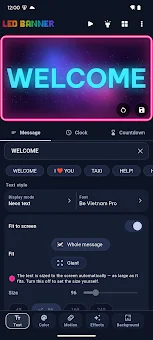
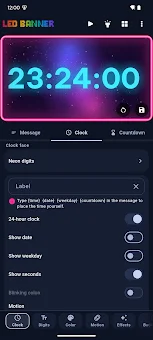
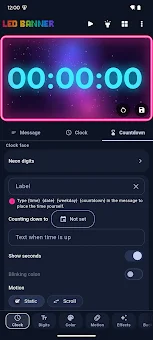
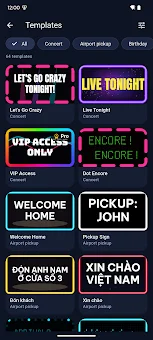
Led Banner transforms your Android smartphone into a full-screen LED display board, offering a versatile tool for creating eye-catching digital signs in seconds. This unique application allows you to turn your device into a powerful visual aid for various occasions, whether you are greeting friends at an airport, supporting a team at a stadium, or displaying a custom message in a shop window. The process is intuitive: simply enter your text, select a style and effect, and hit play to see your banner come to life with vibrant animations and colors.
The app provides three core text display modes to suit different needs. You can choose standard clear text for readability, a neon effect with glowing contours for a modern look, or an imitation of an LED matrix with adjustable brightness and contrast. Movement animations support four scroll directions, a mirror mode, and a static mode, giving you full control over how your message is presented.
You can adjust brightness, delays, and repeat modes to ensure your banner stands out in any environment. Visual customization is extensive, with a wide color gamete allowing you to set any text and background color. You can create multi-level gradients with rotation effects to add depth and interest.
The app includes nine light effects such as blinking, pulsation, rainbow, shimmer, wave, zoom, neon shimmer, and color cycling, which can be combined up to three at once for complex visual experiences.
How to install the app
- Check the version, Android compatibility, developer and source in the app details block.
- Open the official app page on Google Play if a link is available.
- Before installing, review app permissions and use only sources you trust.
Frequently asked questions
Does Led Banner require an internet connection to work?
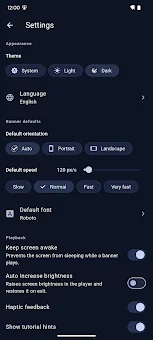
No, Led Banner works completely offline. All data is stored locally on your device, so you do not need an internet connection to create or display your banners.
Can I use my own photos as backgrounds in Led Banner?
Yes, in the Pro version of Led Banner, you can upload and use your own personal photos as backgrounds for your LED signs and custom banners.
What formats can I export my Led Banner designs to?
The Pro version allows you to export your created designs in GIF, PNG, or MP4 formats, making them suitable for sharing, live wallpapers, or further editing.
Does Led Banner require permission to access my contacts or camera?
No, Led Banner does not require registration, account sign-ins, or access to your camera, microphone, geolocation, or contacts, ensuring your privacy is maintained.

No comments yet. Be the first!