

My SafeLink
DownloadApp details
- Version
- 2.1.6
- Updated
- 17.10.2026
- Compatibility
- Android 7.0+
- Package name
com.safelinkwireless.app- Source
- Official Google Play page
Introducing the official My SafeLink app, your go-to solution for managing your SafeLink Wireless account conveniently from your Android device. With this app, you can access all your account details and benefits directly from your phone's lock screen, making it easier than ever to stay connected. Whether you need to manage your Lifeline service or check your balance, the My SafeLink app consolidates everything into a user-friendly interface.
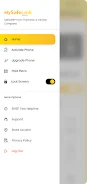
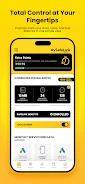
To get started, simply download the app and enter your SafeLink number. You will receive a verification code via text to confirm your identity. Once logged in, you can easily upgrade and activate your device, purchase paid plans, recertify your service, check your balance, and even contact customer care directly from the app.
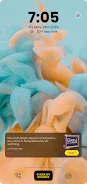
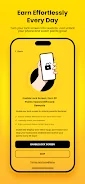
The intuitive design allows you to read important content right from your lock screen, ensuring you have quick access to everything you need. The My SafeLink app is specially designed to enhance your experience with lock screen functionality, allowing you to manage your wireless service effortlessly. Not a SafeLink customer yet?
You can apply for service at www.safelinkwireless.com and enjoy the benefits of this comprehensive app. Please note that standard data rates may apply when downloading or using this app. Information may be transmitted with a delay and may not accurately reflect your actual balances, so it’s always a good idea to check directly through the app for the most up-to-date information.
How to install the app
- Check the version, Android compatibility, developer and source in the app details block.
- Open the Downloads tab and use the official source or an available catalog link.
- Before installing, review app permissions and use only sources you trust.
Frequently asked questions
How do I log into the My SafeLink app?
Enter your SafeLink number and verify your identity with the code sent via text.
What features are available in the My SafeLink app?
You can upgrade devices, purchase plans, check balances, and contact customer care.
Is the app free to download?
Yes, the My SafeLink app is free to download from the Google Play Store.
Can I apply for SafeLink service through the app?
No, but you can apply at www.safelinkwireless.com.
Similar apps









No comments yet. Be the first!