

WiFi Strength Meter & Analyzer
DownloadApp details
- Version
- 2.5
- Updated
- 28.09.2026
- Category
- Tools
- Compatibility
- Android 7.0+
- Package name
com.ilyas.ilyasapps.wifistrengthmeter- Developer
- Mobilia Apps
- Source
- Official Google Play page
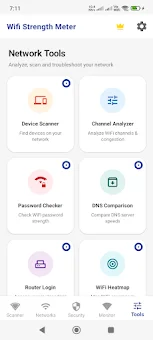
Stop guessing why your internet feels slow and start seeing the invisible waves around you. WiFi Strength Meter is a complete toolkit designed to measure, map, and fix your wireless network issues with precision. Instead of relying on vague feelings of lag, this app provides live signal readings, real speed tests, and detailed coverage maps to help you understand exactly how your WiFi behaves in every corner of your home or office.
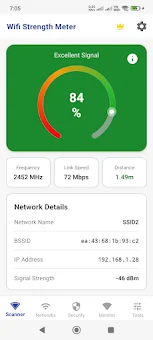
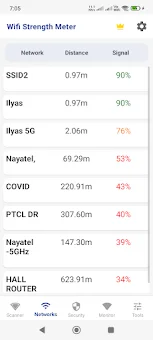
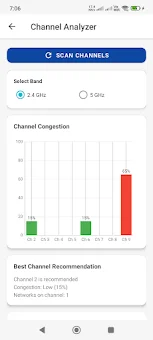
It combines four essential tools into one powerful Android application, saving you time and money by eliminating the need for multiple separate utilities. The core of the experience is the signal meter, which displays live WiFi signal strength in dBm for your network and every surrounding network. You can view detailed information for each network to compare performance.
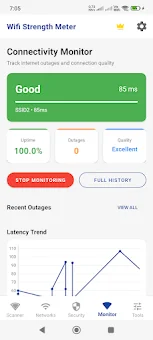
The built-in speed test measures download, upload, ping, and jitter, storing a full history so you can prove whether your connection has improved or degraded over time. This data is crucial for troubleshooting or when speaking with your internet service provider about consistent issues. Visualize your network coverage with the WiFi heatmap feature.
By walking around your space and taking readings, you can build a map that shows exactly where the signal dies and where it thrives. This turns abstract complaints like slow upstairs WiFi into a concrete picture you can act on.
How to install the app
- Check the version, Android compatibility, developer and source in the app details block.
- Open the Downloads tab and use the official source or an available catalog link.
- Before installing, review app permissions and use only sources you trust.
Frequently asked questions
Does WiFi Strength Meter require location permission on Android?
Yes, Android requires location permission for WiFi scanning. This app uses it to scan networks and enable features like the heatmap and device discovery.
What is the difference between the free and premium versions?
The premium version removes ads, unlocks unlimited history, and allows CSV or PDF exports. It also shows all detected devices, while the free version lists only five.
How does the WiFi heatmap feature work?
The heatmap works by recording signal readings as you walk through your space. It then builds a visual map showing exactly where your WiFi signal is strong or weak.
Can I use this app to check for security threats?
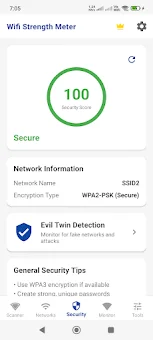
Yes, the app includes a security scanner with evil twin alerts. It warns you when a suspicious network imitates one you trust, helping you spot rogue access points.






No comments yet. Be the first!