

ZOOM
DownloadApp details
- Version
- 7.1.0.41065
- Updated
- 13.10.2026
- Category
- Tools
- Compatibility
- Android 9.0+
- Package name
us.zoom.videomeetings- Source
- Official Google Play page
Zoom Workplace is a versatile collaboration app that combines video meetings, chat, phone calls, documents, calendars, email, a drawing board, and much more. Whether you're working remotely, in the office, or on the go, Zoom Workplace keeps your team connected and helps you efficiently accomplish tasks—all within a single app. Key features of Zoom Workplace include an integrated AI assistant that helps prepare for meetings, take notes, review missed messages, and create content faster.
You can easily schedule or join video meetings with just a tap. The chat feature allows seamless messaging with colleagues and external contacts. Additionally, the phone functionality enables making and receiving calls, as well as sending SMS.
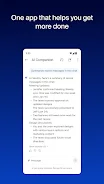
Document sharing and automatic meeting summaries are enhanced by the AI Companion, ensuring nothing is overlooked. Switching between devices during live calls is seamless, ensuring you never lose connection. Zoom Workplace is perfect for any team aiming to boost productivity and efficiency.
It’s an ideal solution for businesses operating in a hybrid model, freelancers, and entrepreneurs needing a convenient tool for project management and communication. In summary, Zoom Workplace consolidates all the essential collaboration tools into one app, allowing you to focus on important tasks without wasting time switching between different platforms. Stay connected, work efficiently, and make the most of your time with Zoom Workplace.
How to install the app
- Check the version, Android compatibility, developer and source in the app details block.
- Open the Downloads tab and use the official source or an available catalog link.
- Before installing, review app permissions and use only sources you trust.
Frequently asked questions
What is Zoom Workplace?
Zoom Workplace is a collaboration app that integrates video meetings, chat, and more for efficient teamwork.
Is Zoom Workplace suitable for remote work?
Yes, it is designed for remote, office, and on-the-go work environments.
What features does Zoom Workplace offer?
It includes video calls, chat, phone functionality, document sharing, and an AI assistant.
Can I switch devices during a call?
Yes, you can switch between devices without losing connection during live calls.





No comments yet. Be the first!