
Koodo Reader
DownloadApp details
- Version
- 2.4.1
- Updated
- 13.10.2026
- Category
- Reading and news
- Compatibility
- Android 7.0+
- Package name
com.koodoreader.expo- Source
- Official Google Play page
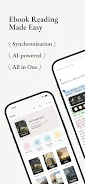
Koodo Reader is a powerful eBook reader designed to manage and read local electronic books effortlessly. This app supports a wide range of popular formats including EPUB, PDF, MOBI, AZW3, TXT, comics, and more. With seamless integration to personal NAS and cloud storage, Koodo Reader provides a convenient cross-platform experience for users.
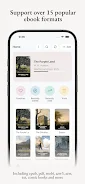
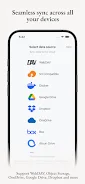
The application boasts extensive format support, handling formats such as EPUB, PDF, MOBI, AZW3, AZW, TXT, FB2, CBR, CBZ, CBT, CB7, MD, DOCX, HTML, XML, XHTML, MHTML, and HTM. This ensures that you can read virtually any eBook without compatibility issues. Koodo Reader also integrates with major cloud services like OneDrive, Google Drive, Dropbox, pCloud, Baidu Netdisk, 115 Netdisk, Aliyun Drive, Yandex Disk, and Box, making it easy to access your library from anywhere.
Koodo Reader is compatible with network protocols, supporting WebDAV, self-hosted Docker, SMB, FTP, SFTP, and S3-compatible object storage. This versatility allows users to connect to various storage solutions and access their eBooks seamlessly. The app also features synchronization across devices, automatically updating your library, reading progress, bookshelves, notes, and highlights, ensuring you never lose your place.
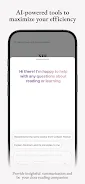
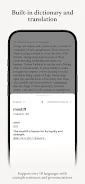
With AI-powered tools such as a built-in dictionary, translation, and smart summarization, Koodo Reader enhances your reading experience. Whether you're a student, professional, or simply a literature enthusiast, this app caters to all. You can customize the interface by changing fonts, themes, activating night mode, and enjoying optimized layouts for any screen size.
In conclusion, Koodo Reader is an indispensable tool for anyone who values convenience and functionality in eBook reading. Download now to explore a world of literature at your fingertips.
How to install the app
- Check the version, Android compatibility, developer and source in the app details block.
- Open the Downloads tab and use the official source or an available catalog link.
- Before installing, review app permissions and use only sources you trust.
Frequently asked questions
What formats does Koodo Reader support?
Koodo Reader supports EPUB, PDF, MOBI, AZW3, TXT, and many more formats.
Can I sync my library across devices?
Yes, Koodo Reader automatically syncs your library, reading progress, and notes across devices.
Is Koodo Reader compatible with cloud services?
Yes, it integrates with OneDrive, Google Drive, Dropbox, and other cloud services.
Does Koodo Reader have customization options?
Yes, you can customize fonts, themes, and layouts to suit your reading preferences.
Similar apps






No comments yet. Be the first!