

Microsoft Launcher
DownloadApp details
- Version
- 6.260402.0.1178950 (1178950)
- Updated
- 02.09.2021
- Category
- Tools
- Package name
com.microsoft.launcher- Developer
- Microsoft Corporation
- Source
- Official Google Play page
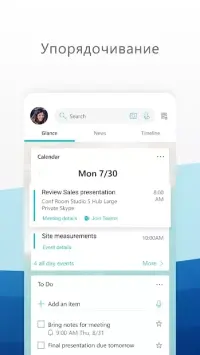
Microsoft Launcher is a powerful and intuitive home screen application for Android devices, designed to streamline your daily interactions and enhance productivity. Developed by the renowned technology brand, this launcher offers a clean, modern interface that adapts to your usage patterns, making it easier to access your most important apps and information. The interface is thoughtfully divided into distinct sections, ensuring a clutter-free experience that prioritizes efficiency and ease of use.
The first section of the interface allows you to quickly browse through your contact list. You can make outgoing calls or send comprehensive SMS messages with just a tap, reducing the steps needed to connect with others. This feature is particularly useful for users who value speed and convenience in their communication tools, allowing for seamless interaction without navigating through multiple menus.
The central area of the launcher aggregates information about the applications installed on your device. It provides a visual representation of your usage habits, showing the percentage ratio of frequently used programs and video games. This insight helps you organize your home screen more effectively, placing your most-used apps at your fingertips while keeping less frequently used ones out of the way.
It serves as a smart dashboard for your digital life. The third area acts as a smart notification hub, reminding you of important dates and setting alarms.
How to install the app
- Check the version, Android compatibility, developer and source in the app details block.
- Open the Downloads tab and use the official source or an available catalog link.
- Before installing, review app permissions and use only sources you trust.
Frequently asked questions
What is the main advantage of using Microsoft Launcher on Android?
Microsoft Launcher offers a streamlined interface that organizes your apps and contacts efficiently, while also providing smart features like automatic wallpaper changes and integrated calendar reminders to enhance daily productivity.
Does Microsoft Launcher support quick contact access and messaging?
Yes, the launcher includes a dedicated section for browsing contacts, allowing you to make outgoing calls or send comprehensive SMS messages directly from the home screen without navigating through multiple menus.
How does Microsoft Launcher help with app organization?
The central area of the app aggregates information about installed applications, showing usage ratios of frequently used programs and games. This helps users prioritize their most-used apps and keep their home screen organized and clutter-free.
Is Microsoft Launcher optimized for performance on older Android devices?
Yes, the application is designed with optimized performance in mind, ensuring smooth operation even on devices with limited resources. Regular updates also introduce new features to maintain compatibility and enhance the user experience over time.








No comments yet. Be the first!