
Split Screen Player: 36 Videos
DownloadApp details
- Version
- 1.0.0
- Updated
- 13.09.2026
- Category
- Multimedia
- Compatibility
- Android
- Package name
com.nightonke.android.splitscreenplayer- Source
- Official Google Play page
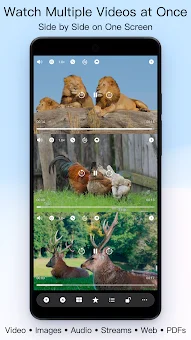
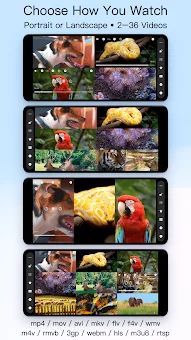
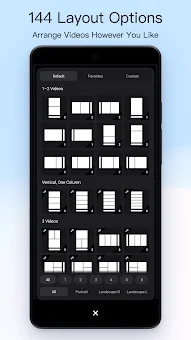
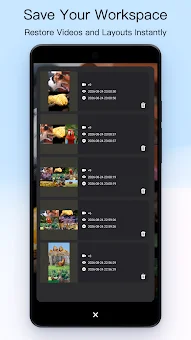
Split Screen Player is a unique and powerful video player application designed for Android devices that allows you to watch, compare, sync, and export multiple videos simultaneously on a single screen. This versatile app supports displaying up to 36 videos at once, offering 144 built-in layouts for convenient content arrangement. You can also create custom individual layouts tailored to your specific workflow, making it an ideal tool for professional analysis or casual viewing.
The application features multi-tasking playback in both portrait and landscape modes, ensuring flexibility for various screen orientations and user preferences. Control all active videos simultaneously using global buttons for play, pause, rewind, mute, speed adjustment, and volume normalization. A key feature is the Sync Lock tool, which allows you to set synchronization points and align identical moments across multiple videos at the same time.
For detailed analysis of movements, the app includes step-by-step frame-by-frame rewind with millisecond time display. This precision helps users identify subtle differences or similarities between clips, enhancing the overall viewing and analytical experience significantly. The app supports a wide range of media formats, including MP4, MOV, MKV, AVI, WebM, and others.
You can play local files, audio, images, PDF documents, and even browse web pages or live streams (HLS, RTSP) alongside your videos.
How to install the app
- Check the version, Android compatibility, developer and source in the app details block.
- Open the Downloads tab and use the official source or an available catalog link.
- Before installing, review app permissions and use only sources you trust.
Frequently asked questions
How many videos can I watch simultaneously?
The application supports displaying up to 36 videos simultaneously on a single screen, allowing for extensive multi-view analysis and comparison of different clips and content sources effectively.
What video formats are supported?
The app supports a wide range of media formats including MP4, MOV, MKV, AVI, and WebM, along with local files, audio, images, PDFs, and live streams like HLS and RTSP.
Can I export my workspace as a video file?
Yes, you can export the current workspace into a single MP4 file with customizable resolution, frame rate, watermarks, and background options for easy sharing or archiving.
Is there a feature to sync multiple videos?
Yes, the Sync Lock tool allows you to set synchronization points and align identical moments across multiple videos simultaneously, which is useful for detailed analysis and comparison.
Similar apps


No comments yet. Be the first!