
Screen Suite (Screen Timeout)
DownloadApp details
- Version
- 2.9.0
- Updated
- 09.10.2026
- Category
- Tools
- Compatibility
- Android 6.0+
- Package name
com.cozyme.app.screenoff- Source
- Official Google Play page
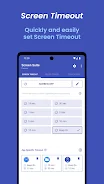
Screen Suite (Screen Timeout) is a versatile Android application designed to give you complete control over your device's display settings. This utility helps you manage screen timeout durations effectively, preventing screen burn-in and extending the lifespan of your OLED or LCD panels. By allowing you to customize how long your screen stays on during inactivity, it ensures that your device operates efficiently without wasting power on unnecessary illumination.
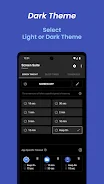
One of the standout features of this APK is the intelligent screen saver. It automatically activates based on your specific timeout settings, providing a seamless transition that protects your display while you are not actively using the phone. This feature is particularly useful for users who leave their devices running for extended periods, as it mitigates the risk of permanent image retention or burn-in on sensitive screen technologies.
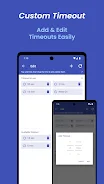
The app also offers granular control by allowing you to set separate timeouts for individual applications. This means you can configure a longer screen duration for media players or games while keeping a shorter timeout for utility apps. Additionally, the instant screen lock feature enables you to turn off the display with a single tap, securing your device with PIN codes or biometric data for enhanced privacy and convenience.
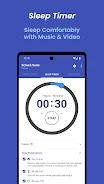
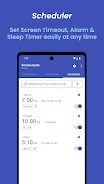
For entertainment enthusiasts, the sleep timer is an invaluable tool.
How to install the app
- Check the version, Android compatibility, developer and source in the app details block.
- Open the Downloads tab and use the official source or an available catalog link.
- Before installing, review app permissions and use only sources you trust.
Frequently asked questions
Does Screen Suite help prevent screen burn-in?
Yes, it features an intelligent screen saver that activates based on your timeout settings to protect the display from image retention.
Can I set different timeouts for different apps?
Absolutely. The app allows you to configure unique screen timeout durations for individual applications, optimizing usage for each context.
How does the sleep timer work?
The sleep timer allows you to set a duration for media playback. Once the time expires, the app can lock the screen or pause content, saving battery life during sleep.
Similar apps







No comments yet. Be the first!