
Windows 7 Task Bar 1.8
DownloadApp details
- Updated
- 09.10.2026
- Category
- Miscellaneous
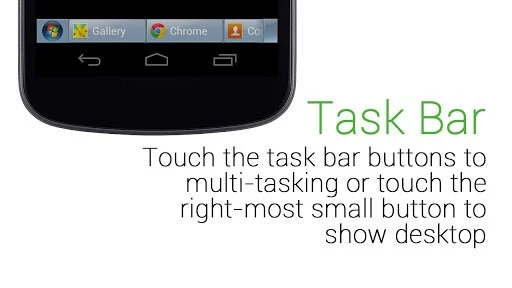
Windows 7 Task Bar 1.8 is a unique launcher designed for Android devices, bringing the familiar interface of the Windows 7 desktop to your mobile experience. This app transforms your Android device, allowing users to navigate their applications just like they would on a traditional PC. With a simple tap on the 'Start' button located in the corner of the screen, users can easily access their favorite apps and settings, streamlining the way you interact with your device.
This launcher not only enhances usability but also provides a nostalgic feel for those who appreciate the Windows 7 aesthetic. Users can customize their taskbar, arranging apps and shortcuts for quick access. The design mimics the classic Windows interface, making it intuitive for anyone familiar with the desktop environment.
This blend of familiarity and functionality makes Windows 7 Task Bar 1.8 a must-have for Android users looking for a different way to manage their apps. In addition to its user-friendly interface, the Windows 7 Task Bar 1.8 app is lightweight and optimized for performance, ensuring that it runs smoothly on various Android devices. It supports a range of resolutions, adapting to different screen sizes while maintaining clarity and usability.
Whether you are a long-time Windows user or new to the platform, this launcher can enhance your Android experience. Download Windows 7 Task Bar 1.8 today and transform your Android device into a Windows-like environment. Experience the convenience of a desktop-style taskbar at your fingertips, making app management easier than ever before.
How to install the app
- Check the version, Android compatibility, developer and source in the app details block.
- Open the Downloads tab and use the official source or an available catalog link.
- Before installing, review app permissions and use only sources you trust.
Frequently asked questions
What is Windows 7 Task Bar 1.8?
It is a launcher for Android that replicates the Windows 7 desktop interface.
How do I access my apps?
Tap the 'Start' button to open a menu where you can select your apps.
Is it customizable?
Yes, you can arrange apps and shortcuts on the taskbar for easier access.
Does it work on all Android devices?
It is optimized for performance and supports a range of Android devices.



No comments yet. Be the first!