

OnClean-Phone Clean
Open in Google PlaySpaceAPK does not provide APK files. A listed Google Play link is a reference: check the store for availability, version, price and paid features. The catalog version is not offered as a downloadable file.
App details
- Updated
- 19.11.2026
- Category
- Tools
- Compatibility
- ANDROID
- Package name
com.cleonan.cpho- Developer
- Ayadev2023
- Source
- Google Play reference
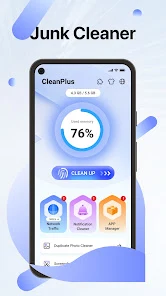
OnClean is a straightforward and reliable Android application designed to help you maintain a tidy and efficient device without compromising your personal data. The app provides essential tools for managing storage, organizing files, and removing unnecessary clutter, all while keeping the user interface simple and intuitive. It is built to be respectful of your privacy, ensuring that your digital environment remains organized and fast.
One of the core features is the Photo and Video Cleaner, which addresses the common issue of storage filling up with unused media. Over time, screenshots, old photos, and redundant videos accumulate in the background. OnClean allows you to review these files systematically, making it easy to identify and remove unwanted items to free up valuable space on your device.
The Large File Finder tool is another powerful asset for users who struggle with hidden storage hogs. It quickly scans your device to locate large documents, videos, and downloads, sorting them by size. This feature gives you a clear overview of what is taking up the most room, allowing you to make informed decisions about what to keep and what to delete with a single tap.
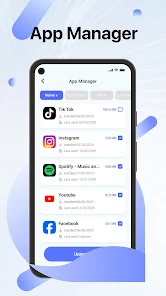
Additionally, the App Manager provides a comprehensive overview of all installed applications. You can see exactly how much space each app consumes, when it was installed, and easily uninstall those you no longer need.
Availability and source
- Check the version, Android compatibility, developer and source in the app details block.
- Open the official app page on Google Play if a link is available.
- Before installing, review app permissions and use only sources you trust.
Frequently asked questions
Does OnClean upload my photos to the cloud?
No, OnClean processes all data locally on your device. Your photos and files are never uploaded to any external server, ensuring your personal data remains private and secure during the cleaning process.
How does OnClean help free up storage space?
OnClean helps free up space by systematically scanning for unused photos, videos, large files, and unnecessary apps. It allows you to review and delete these items easily, reclaiming valuable storage on your Android device.
Is OnClean suitable for managing large files?
Yes, the Large File Finder feature quickly locates hidden documents, videos, and downloads sorted by size, allowing you to easily identify and remove items that are taking up significant storage space.
Can I uninstall apps directly from OnClean?
Yes, the App Manager feature provides an overview of all installed apps, showing their storage usage and installation date, allowing you to easily uninstall applications you no longer need to keep your phone organized.








No comments yet. Be the first!
Leave a comment