

PigCloud: Encrypted Storage
DownloadApp details
- Version
- 1.0.0
- Updated
- 03.10.2026
- Category
- Tools
- Compatibility
- Android
- Package name
de.pigcloud.app- Developer
- PigTech
- Source
- Official Google Play page
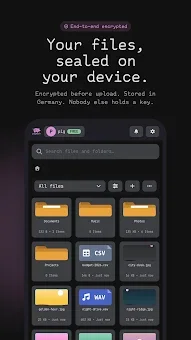
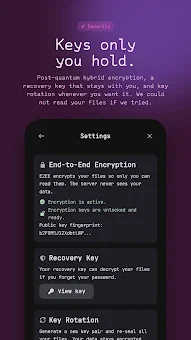
PigCloud is a privacy-focused cloud storage application designed for Android users who demand absolute confidentiality for their digital files. Unlike traditional cloud services, PigCloud employs a unique architecture where all data encryption happens directly on your device before the files ever leave it. This means that not only the file contents but also the folder names remain encrypted on the server, ensuring that the service provider cannot read your data.
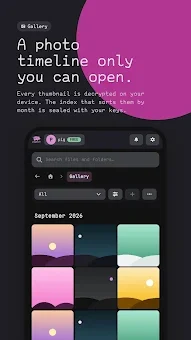
Your password never travels to the server, and encryption keys are stored locally on your devices, providing a robust layer of security for your personal information. The application features an intuitive interface that allows you to easily browse, download, and organize your files from your phone. The gallery automatically sorts photos and videos by date, enabling you to view them in full-screen mode and switch between albums seamlessly.
You can take snapshots with your camera and immediately save them to the desired folder, or share files from any other application directly into PigCloud using the standard Android share menu. This seamless integration makes managing your digital assets quick and efficient without sacrificing privacy. Privacy is built into the very core of PigCloud.
You have full control over shared access, allowing you to share folders with other PigCloud users or create public links with passwords, expiration times, and download limits.
How to install the app
- Check the version, Android compatibility, developer and source in the app details block.
- Open the Downloads tab and use the official source or an available catalog link.
- Before installing, review app permissions and use only sources you trust.
Frequently asked questions
How does PigCloud ensure my data is private?
PigCloud encrypts all data, including folder names, directly on your device before it is uploaded to the server. Your password never leaves your device, and encryption keys are stored locally, ensuring the server cannot read your files.
Where are PigCloud files stored on my Android device?
Downloaded files from PigCloud are automatically saved to the Download/PigCloud folder on your Android device, making them easily accessible for offline viewing and management.
Can I share files securely with friends using PigCloud?
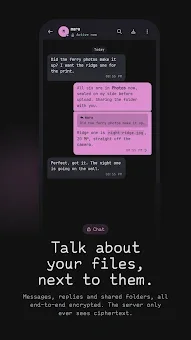
Yes, PigCloud includes a built-in chat feature that allows you to share files with friends. All file transfers in the chat use end-to-end encryption, ensuring that only you and the recipient can read the content.
Does PigCloud keep previous versions of my files?
Yes, PigCloud stores previous versions of your files. The number of versions and the retention period depend on your specific tariff plan, allowing you to restore any previous version with a single tap.





No comments yet. Be the first!