
Root Explorer 4.12.7
App details
- Updated
- 16.06.2025
- Category
- Miscellaneous
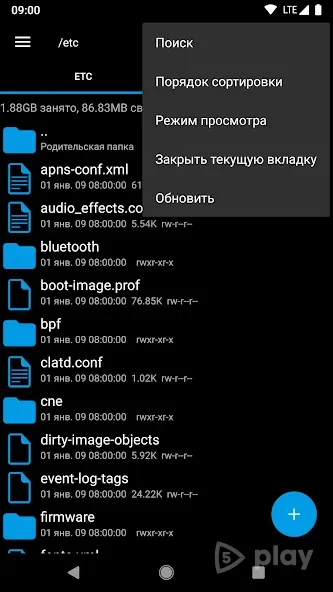
Root Explorer 4.12.7 stands out as a robust and feature-rich file manager designed specifically for Android devices. Unlike standard file browsers, this application grants users deep access to the entire file system, including system directories that are typically hidden from regular apps. It is an essential tool for power users who need to manage, edit, and organize files with precision and control.
The interface is intuitive yet powerful, allowing you to browse all files stored on your gadget's memory with ease. One of the key advantages of Root Explorer is its ability to handle files that other apps cannot. You can view and modify system files, which is crucial for customizing your Android experience.
The app supports a wide range of features not found in similar programs, such as batch renaming, file compression, and editing text files directly. This makes it a versatile solution for both everyday file management and advanced system tweaking tasks. Accessing the internal storage is seamless, whether you are dealing with media files, documents, or application data.
The APK version ensures that you can install and use the file manager even on devices without root permissions, though root access unlocks the full potential of the system file editing capabilities.
How to install the app
- Check the version, Android compatibility, developer and source in the app details block.
- Open the official app page on Google Play if a link is available.
- Before installing, review app permissions and use only sources you trust.
Frequently asked questions
Does Root Explorer 4.12.7 require root access?
No, the app works without root for basic file management, but root access is required to edit system files and change permissions.
Can I edit text files with Root Explorer?
Yes, Root Explorer includes a built-in text editor that allows you to view and modify configuration and log files directly.
Is Root Explorer safe to use?
Yes, it is a trusted file manager. However, when editing system files with root access, users should be careful to avoid modifying critical system components.
What features distinguish Root Explorer from other file managers?
It offers deep system access, batch file operations, and the ability to edit system files, which are not commonly found in standard file browsers.






No comments yet. Be the first!